
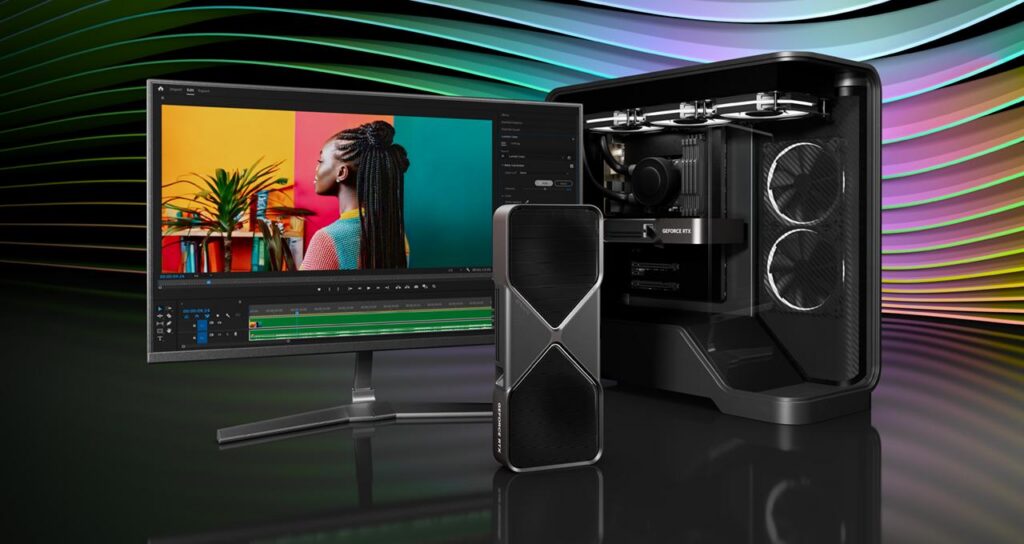
Every GPU generation crowns a new king, and in 2026 that throne belongs to the RTX 5090 graphics card. Built on NVIDIA’s Blackwell architecture, packing 32 GB of GDDR7 and a monstrous 21,760 CUDA cores, it’s the most powerful GeForce card ever made. But raw power doesn’t automatically mean it’s right for you. So the real question isn’t whether the 5090 graphics card is fast, it obviously is. It’s whether the price, the wattage, and the sheer size make sense for what you actually do.
Key Specs and What Sets the RTX 5090 Apart
The RTX 5090 graphics card isn’t just a bigger version of the 4090, it’s a fundamentally different beast built on the Blackwell GB202 die. The headline number everyone latches onto is that 32 GB of GDDR7 memory, running across a 512-bit bus for a staggering 1,792 GB/s of bandwidth. That’s a genuine leap, not a marketing footnote.
Here’s how the core hardware breaks down:
| Spec | RTX 5090 |
|---|---|
| Architecture | Blackwell GB202 |
| CUDA cores | 21,760 |
| RT cores | 170 (4th-gen) |
| Tensor cores | 680 (5th-gen) |
| Memory | 32 GB GDDR7 |
| Bandwidth | 1,792 GB/s |
| Boost clock | ~2.41 GHz |
| AI compute | ~3,352 TOPS (FP4) |
| Total board power | ~575 W |
In traditional rasterized workloads, you’re looking at roughly a 21–27% uplift over the RTX 4090. But that number undersells things. Where the 5090 graphics card really pulls ahead is in AI and ray tracing, thanks to FP4 support and those fifth-gen Tensor cores doing the heavy lifting.
Gaming Performance: Ray Tracing, DLSS, and Real FPS
Let’s be honest about what this card is for: 4K gaming at maximum settings with full ray tracing switched on. That’s the target, and the RTX 5090 graphics card hits it harder than anything before it. Notebookcheck’s testing shows around 25% higher ray tracing performance than the 4090, and that’s before you touch any frame generation.
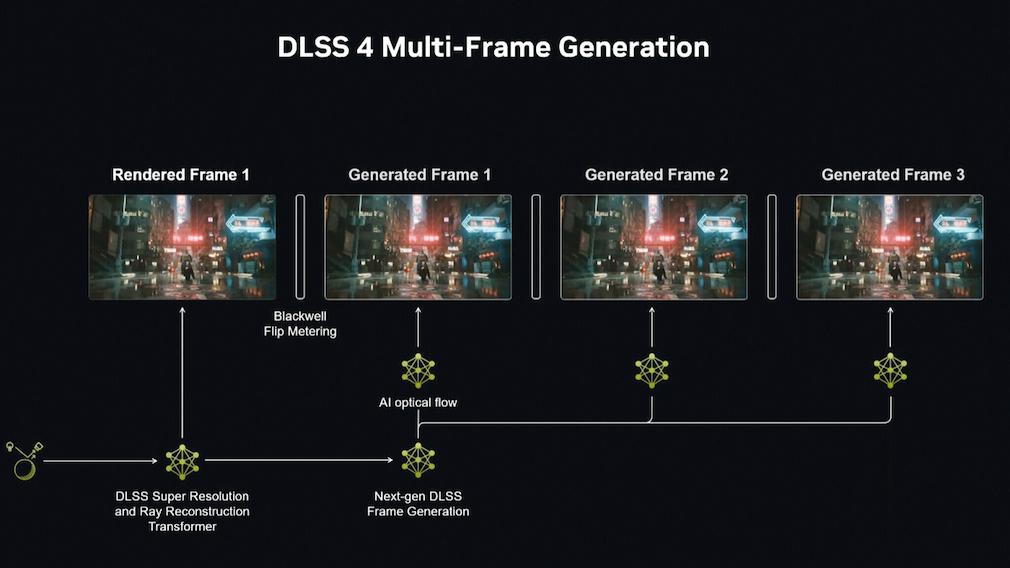
Then there’s DLSS 4 and its Multi Frame Generation. Depending on the mode you pick, the GPU renders one native frame and then conjures up to three additional AI-generated frames, pushing on-screen FPS counts into territory brute-force silicon simply can’t reach. Over 100 titles already support it.
Is it controversial? A little. Some players swear by the smoothness: others prefer sticking to 2x mode for lower-latency living-room play. My take: MFG is a tool, not a mandate. Use it where it feels right, and enjoy the fact that the 5090 graphics card gives you a native-render safety net most cards can only dream of.
AI and Creative Workloads Powered by RTX
Gaming might grab the headlines, but the RTX 5090 graphics card quietly makes one of the strongest arguments as a workstation card. That 32 GB of VRAM isn’t just future-proofing, it’s the difference between loading a 24–32 GB AI model locally and being locked out entirely.
Benchmarks tell the story: roughly 40% faster AI performance in FP16 tasks versus the 4090, and about 12% quicker in DaVinci Resolve. Add FP4 support and thousands of AI TOPS, and you’ve got the fastest consumer AI GPU on the market, full stop.
Creators get spoiled too. The ninth-gen NVENC encoder tears through video exports in Premiere and Resolve, while NVIDIA Studio drivers keep the whole stack stable. Toss in RTX Video Super Resolution, AI-enhanced streaming tools, and RTX Remix for modders, and the 5090 graphics card earns its keep long after you’ve closed the game launcher.
Founders Edition Design and Cooling
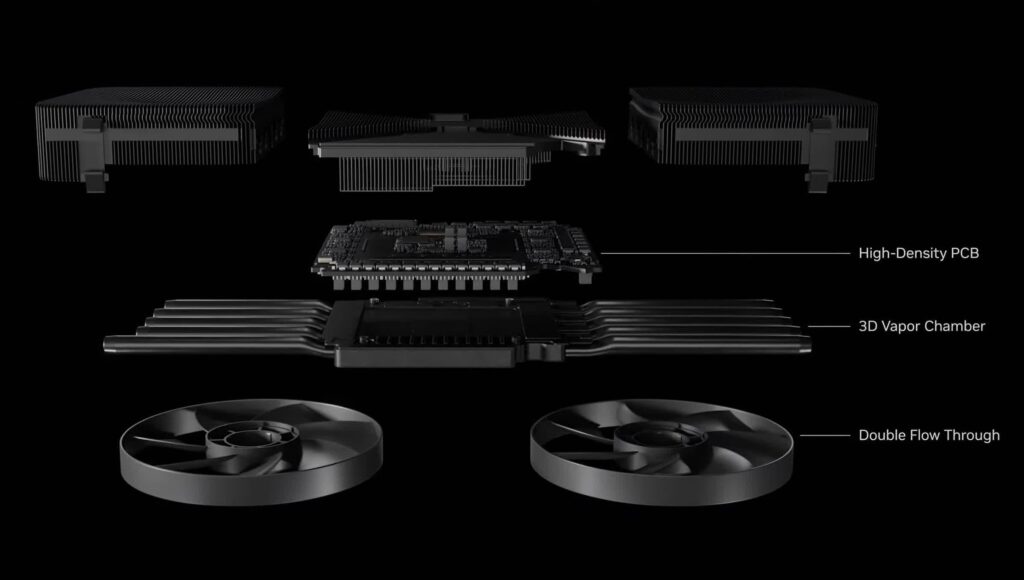
NVIDIA did something clever with the Founders Edition of the RTX 5090 graphics card: they shrank it. Even though a 575 W power budget, the reference card ships as a compact three-slot design with dual flow-through fans that push air straight through the card rather than trapping it inside your case.
Under the shroud sits a 3D vapor chamber with integrated heat pipes and active fins, NVIDIA calls it the highest-performance dual-slot-class cooler they’ve ever built, delivering roughly double the airflow of a conventional layout.
Connectivity is properly modern too. You get PCIe 5.0 x16, DisplayPort 2.1b, and support for output resolutions up to 8K at 165 Hz. For a card this powerful, the restraint in the physical design is genuinely impressive.
Preparing Your System: Power Supply and Case Requirements
Before you drop a 5090 graphics card into your rig, do a reality check on your build. This card pulls around 575 W on its own, and NVIDIA recommends a PSU in the neighborhood of 1000 W for a typical high-end system. A higher rating may be needed depending on your CPU and the rest of your components.
Power delivery matters here:
- Option 1: Three PCIe 8-pin cables into the included power adapter (the card supports 3x or 4x 8-pin).
- Option 2: A single 450 W or greater PCIe Gen 5 power cable straight from the PSU.
Case clearance is the other gotcha. You’ll want space for a card measuring about 304mm x 137mm across three slots, plus roughly 36mm of extra room for cable routing. Leaving an empty expansion slot beside it improves airflow noticeably. Cramming the 5090 graphics card into a tight mid-tower is asking for thermal headaches.
Pricing, Value, and Who Should Buy It
Now the uncomfortable part. The RTX 5090 graphics card launched at an MSRP of $1,999, and real-world pricing has often run well above that, plenty of early buyers paid several hundred dollars over sticker. As of mid-2026, market prices have hovered around the $4,100+ mark in some listings, a reminder that flagship demand rarely cools quickly.
So who’s this actually for?
| Buyer type | Worth it? |
|---|---|
| Enthusiast 4K + ray tracing gamer | Yes, nothing else touches it |
| AI researcher / ML engineer needing 32 GB VRAM | Absolutely |
| Video editor / 3D creator | Strong yes |
| 1440p gamer | No, overkill |
| Budget-conscious builder | Look lower in the stack |
If you’re running smaller AI models or gaming at 1440p, a lower-tier card gives you far better value. The 5090 graphics card is a no-compromise tool for people who genuinely need no compromises. If flagship performance isn’t essential, the RTX 4080 remains an excellent choice for 4K gaming, offering strong ray tracing performance and lower power consumption at a significantly more accessible price point.
Conclusion
The RTX 5090 graphics card is exactly what a flagship should be: the fastest 4K ray-traced gaming, the best consumer AI performance available, and 32 GB of VRAM that opens doors other cards keep shut. It’s also huge, power-hungry, and expensive. If you’re the demanding user this was built for, it’s worth every watt.
Frequently Asked Questions
Can I run the RTX 5090 on a single monitor cable at 8K?
Yes, its DisplayPort 2.1b output supports up to 8K at 165 Hz, so a single modern cable handles ultra-high-resolution displays.
Does the 5090 need PCIe 5.0 to work?
No. It uses a PCIe 5.0 x16 interface but remains backward compatible with PCIe 4.0 slots, with only minor bandwidth differences in edge cases.
Will DLSS 4 Multi Frame Generation work in every game?
No. It’s limited to supported titles, over 100 at last count, and older games rely on earlier DLSS versions or none at all.