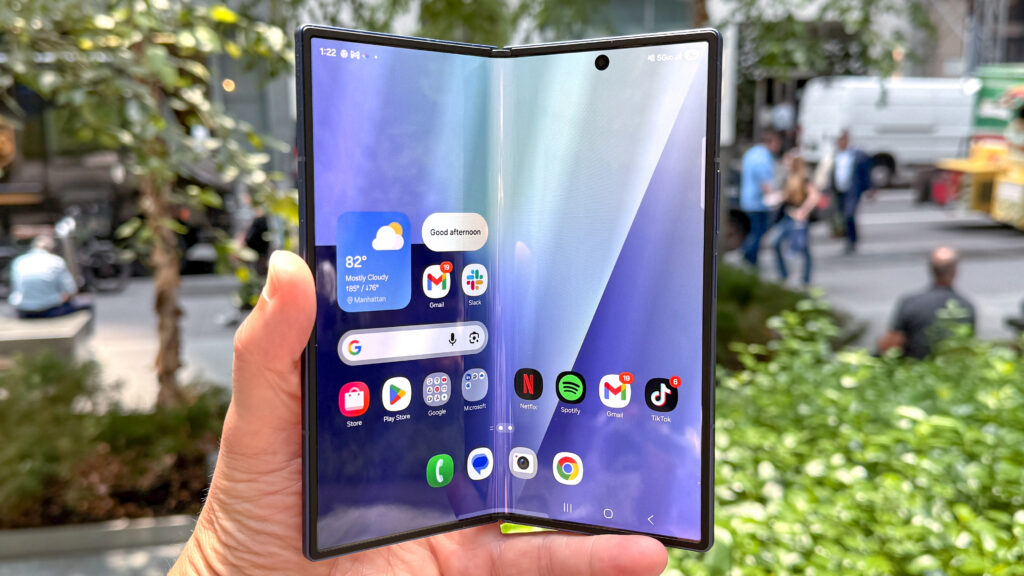
The Samsung Galaxy Z Fold 7 is the foldable phone Samsung needed to make, not just iterate. At $1,899, it’s a serious ask, but this Samsung Galaxy Z Fold 7 review breaks down whether the hardware finally justifies the price. Spoiler: it comes closer than any Z Fold before it. Weighing just 215g and folding into a near-perfect slab, the Galaxy Z Fold 7 redefines what a foldable can feel like in your hand. Here’s everything you need to know before buying.
Samsung Galaxy Z Fold 7 Review: Key Specs and What’s New Over the Z Fold 6
The Samsung Galaxy Z Fold 7 arrives as the thinnest and lightest foldable Samsung has ever shipped, a meaningful claim when you’re holding something that doubles as a tablet.
| Spec | Galaxy Z Fold 7 | Galaxy Z Fold 6 |
|---|---|---|
| Weight | 215g | 239g |
| Cover Screen | 6.5-inch | 6.3-inch |
| Inner Display | 8.0-inch | 7.6-inch |
| S Pen Support | No | Yes |
| Camera Resolution | Higher-res upgrade | Standard |
| Hinge | Refined, satisfying click | Previous gen |
The 6.5-inch cover screen is the single biggest quality-of-life upgrade. Users report handling roughly 85% of daily tasks, texts, emails, quick searches, without ever unfolding. The inner 8-inch display gains trimmed bezels and better outdoor brightness. Notably, S Pen support is gone, which will disappoint power users who relied on it. But the camera hardware has been substantially upgraded over the Z Fold 6, and the redesigned hinge delivers a crisp, premium open-and-close action that the previous model couldn’t match.
Samsung Galaxy Z Fold 7 Review: Design and Durability
Pick up the Galaxy Z Fold 7 and the first thing you notice is how much it feels like a regular flagship. Folded, it carries the density and presence of a premium slab, pointy corners, balanced weight distribution, and buttons positioned exactly where your thumb expects them.
At 215g, it’s actually lighter than the Galaxy S25 Ultra, which is remarkable for a device packing two displays and a hinge mechanism. The thinness draws attention in a room. People notice.
A few real-world trade-offs are worth knowing:
- The rear camera module protrudes, which prevents the phone from lying flat. You’ll want a case.
- Wireless charging requires removing the case, which adds friction to an otherwise smooth daily experience.
- A PopSocket improves one-handed grip significantly, given the wider folded form factor.
The folded width hits a “Goldilocks” tension, slightly too narrow for easy thumb reach across the screen, yet wide enough that typing feels comfortable. Most users adjust within a week. Durability feels solid: the hinge shows no flex or wobble, and Samsung’s Armor Aluminum frame gives the Galaxy Z Fold 7 a confidence-inspiring rigidity.
Displays and Multitasking: Why This Samsung Galaxy Z Fold 7 Review Recommends It for Productivity
The Galaxy Z Fold 7’s 6.5-inch cover screen handles the bulk of daily use. It’s usable for 85% of folded tasks, a real number that reflects a genuine shift from the too-narrow cover screens on earlier Z Fold models.
Unfold it, and you get an 8-inch display with a 4:3-ish aspect ratio that does something slab phones simply can’t: it gives you a near-square canvas that fits approximately 5% more content than a standard 21:9 smartphone display. That sounds small, but on video, documents, and older 4:3 content, think 90s cartoons or classic TV, it’s noticeably better.
Samsung Galaxy Z Fold 7 Review: Real-World Multitasking Experience
Multitasking is where the Galaxy Z Fold 7 pulls away from every slab alternative:
- Run Reddit in one window, YouTube in picture-in-picture, and a Gemini AI overlay simultaneously, no stutter.
- Chrome + YouTube + Gemini trio runs lag-free in everyday use.
- The phone feels more like a folding tablet than a phone, which is either a feature or a caveat depending on your workflow.
For content creators and business users, this multitasking capability alone justifies serious consideration.
Samsung Galaxy Z Fold 7 Review: Camera Performance
The camera system on the Galaxy Z Fold 7 has finally received the attention it deserved. Higher-resolution sensors across the board produce noticeably sharper images compared to the Z Fold 6, detail retention in daylight shots is competitive with flagship bar phones at this price tier.
Low-light performance improves meaningfully, with less noise and better color accuracy in mixed lighting scenarios. Video quality sees a similar jump.
The one persistent caveat: shooting while folded feels like holding a tablet. The bulk and width make one-handed photography awkward, especially for quick candid shots. You adapt, but it’s never as natural as shooting with a traditional flagship.
For the Galaxy Z Fold 7’s target audience, creators who use the inner display as a viewfinder or shoot flat-lay content, the camera bulk is a fair trade. For casual shooters, it may feel cumbersome. The camera system is no longer the Z Fold’s weak link: it’s now a genuine strength, just one that asks you to adjust your shooting habits slightly.
Battery Life, Performance, and AI Features
On power-saving mode, the Galaxy Z Fold 7 stretches to 2–3 days of use, genuinely impressive for a device running two displays. Push it with heavy video streaming or gaming, and you’ll land closer to a full day, which triggers battery anxiety for users who can’t charge mid-day.
Performance is flat-out fast. The processor handles gaming, multitasking, and app switching with zero lag in 2025’s software environment. There are no thermal throttling complaints under typical workloads.
AI features via Gemini add real utility:
- Gemini overlay analyzes images and videos on-screen without switching apps.
- Contextual suggestions appear during browsing and document editing.
- On-device AI responses feel quick and accurate for summaries, translations, and rewrites.
The AI integration doesn’t feel forced. It sits in the background until you need it, which is exactly the right approach for a device that already demands your attention with its hardware.
Pros and Cons: Who Should and Shouldn’t Buy It
Who Should Buy the Samsung Galaxy Z Fold 7
Buy it if you:
- Are upgrading from a Z Fold 5 or Z Fold 6 and want a hardware leap that actually feels different
- Need a 2-in-1 productivity device that doubles as a premium daily driver
- Value the “wow factor”, this phone generates genuine envy
- Do content creation, document editing, or multitasking-heavy work
Who Should Skip It
Avoid it if you:
- Prefer slab phone ergonomics and find wide folded forms uncomfortable
- Rely on S Pen input for note-taking or sketching
- Experience battery anxiety and can’t access a charger during the day
- Want a phone you can use without a case (the camera bump makes that impractical)
| Galaxy Z Fold 7 | Typical Slab Flagship | |
|---|---|---|
| Multitasking | ✅ Best-in-class | ❌ Limited |
| Portability | ✅ 215g, slim | ✅ Lighter, thinner |
| Camera ergonomics | ⚠️ Awkward folded | ✅ Natural grip |
| S Pen support | ❌ Removed | Varies |
| Price | $1,899 | $999–$1,299 |
The Galaxy Z Fold 7 is a clear buy for power users. It’s a pass for anyone who primarily wants a compact, pocketable phone.
Final Verdict: Is the Samsung Galaxy Z Fold 7 Worth It?
This Samsung Galaxy Z Fold 7 review comes down to one simple conclusion: yes, if you’re in the target audience for a foldable flagship. The Samsung Galaxy Z Fold 7 is the first Z Fold that feels like a complete, no-compromise 2-in-1 device. The thinness, the hinge, the wider cover screen, the upgraded cameras: every refinement adds up to something that feels genuinely different from its predecessors.
Is $1,899 steep? Absolutely. But the Galaxy Z Fold 7 delivers a daily experience that most traditional smartphones and even other foldable phones still can’t replicate. If you’ve been waiting for the Z Fold to mature into a proper flagship, this is that phone.
Bottom line: this Samsung Galaxy Z Fold 7 review recommends it as a daily driver for anyone serious about productivity, multitasking, or simply owning the most impressive piece of smartphone hardware available in 2026.
Frequently Asked Questions About the Samsung Galaxy Z Fold 7
What are the key improvements in the Samsung Galaxy Z Fold 7 compared to the Z Fold 6?
The Galaxy Z Fold 7 is 24g lighter at 215g, features a larger 6.5-inch cover screen for 85% folded tasks, an 8-inch inner display with trimmed bezels, higher-resolution cameras, and an improved hinge mechanism. However, it removes S Pen support, a notable trade-off for power users.
How does the Samsung Galaxy Z Fold 7 handle multitasking and productivity?
The Galaxy Z Fold 7 excels at multitasking with its 8-inch inner display, running apps like Chrome, YouTube, and Gemini overlay simultaneously without lag. Its 4:3-ish aspect ratio fits approximately 5% more content than standard phones, making it ideal for content creators and business users.
Is the Samsung Galaxy Z Fold 7 worth the $1,899 price tag?
Yes, if you’re a power user seeking a 2-in-1 productivity device. As highlighted throughout this Samsung Galaxy Z Fold 7 review, it feels like a complete, no-compromise flagship with thinness, premium build, and a daily experience no slab phone can replicate.
What is the battery life on the Samsung Galaxy Z Fold 7?
On power-saving mode, the Galaxy Z Fold 7 stretches to 2–3 days of use, impressive for a dual-display device. With heavy video streaming or gaming, expect around one day, which may trigger battery anxiety for users unable to charge mid-day.
Can you take good photos with the Samsung Galaxy Z Fold 7 while it’s folded?
The Galaxy Z Fold 7 has higher-resolution cameras with improved low-light performance compared to the Z Fold 6. However, shooting while folded feels awkward due to the device’s bulk and width, similar to holding a tablet. It’s better suited for flat-lay content or using the inner display as a viewfinder.
Does the Samsung Galaxy Z Fold 7 support wireless charging and a case?
Yes, the Galaxy Z Fold 7 supports wireless charging, but it requires removing any case, adding friction to daily use. A case is recommended since the protruding rear camera module prevents the phone from lying flat. A PopSocket also significantly improves one-handed grip.