The best Xbox controller for you depends on how you play, what you spend, and what you need. Whether you’re grinding ranked matches, gaming casually on the couch, or shopping for a gift, there’s a specific Xbox controller built for that scenario.
We tested and researched every major option, from Microsoft’s flagship Elite Series 2 to accessibility-focused designs and limited-edition styles, to bring you this ranked list of the best Xbox controllers in 2026. Each pick covers performance, value, build quality, and who it’s actually best for. If you want a quick answer: the Xbox Elite Wireless Controller Series 2 leads for most gamers, but the standard Xbox Wireless Controller delivers the best bang for your buck. Let’s break them all down.
1. Xbox Elite Wireless Controller Series 2: Best Overall Xbox Controller
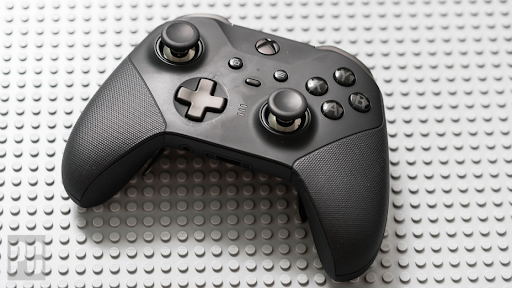
The Xbox Elite Wireless Controller Series 2 is the best overall Xbox controller for the majority of gamers who want a premium, customizable experience without jumping to third-party hardware. It’s Microsoft’s most advanced first-party controller, and it earns that top spot through a combination of adjustable components, long battery life, and a polished build.
| Spec | Detail |
|---|---|
| Connectivity | Wireless (Xbox Wireless + Bluetooth) |
| Battery Life | Up to 40 hours |
| Adjustable Trigger Locks | Yes (3 positions) |
| Rear Paddles | 4 included |
| Interchangeable Thumbsticks | Yes |
| Charging Dock | Included |
| Price (MSRP) | ~$179.99 |
Best for: Competitive players, long gaming sessions, customization enthusiasts.
Why It Dominates: Key Features and Performance Highlights
The Elite Series 2 ships with four swappable rear paddles, interchangeable thumbstick tops (3 shapes and sizes), and a wrap-around rubberized grip that genuinely reduces hand fatigue. The adjustable hair trigger locks let you cut trigger travel to milliseconds, a meaningful edge in fast-paced shooters and competitive Xbox games where reaction time matters
Tension control on the thumbsticks is a standout feature: you can tighten or loosen stick resistance depending on whether you prefer precision aiming or fast movement inputs. The included charging dock charges the controller upright with no cable fumbling.
That said, third-party controllers like the Razer Wolverine V3 Pro have started closing the gap, particularly in wireless latency and Hall-effect stick technology, which resists drift over time. If you’re a serious competitive player with a higher budget, it’s worth comparing both. But for the best Xbox-branded controller experience, the Elite Series 2 remains the benchmark.
2. Xbox Wireless Controller (Standard): Best Value for Everyday Gaming
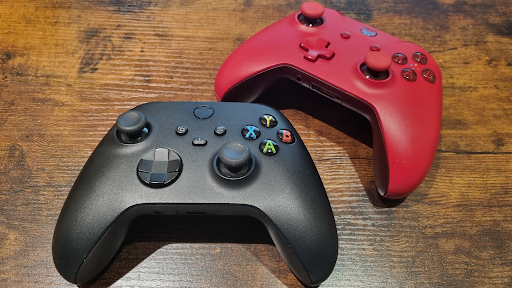
The standard Xbox Wireless Controller is the best Xbox controller for casual gamers and anyone who doesn’t want to overspend. It’s the controller that ships with the Xbox Series X and Series S, and it’s genuinely excellent for its price, typically around $59.99.
| Spec | Detail |
|---|---|
| Connectivity | Xbox Wireless + Bluetooth |
| Battery Life | Up to 40 hours (AA batteries) |
| USB-C Port | Yes |
| Textured Grip | Yes (triggers and bumpers) |
| Share Button | Yes |
| Price (MSRP) | ~$59.99 |
Best for: Casual gamers, first-time buyers, budget-conscious shoppers.
It connects wirelessly via Bluetooth or Xbox Wireless, works across Xbox consoles, Windows PCs, and mobile devices, and delivers a comfortable, ergonomic grip that works for most hand sizes. The textured diamond pattern on the triggers and bumpers improves grip during extended play.
The standard Xbox Wireless Controller doesn’t have rear paddles or adjustable tension, but for the player who games a few hours a week, none of that is missed. Battery life is strong at up to 40 hours per charge, and the USB-C port means no hunting for proprietary cables.
For everyday gaming, no other best Xbox controller in this price range beats it for reliability and comfort.
3. Xbox Elite Wireless Controller Series 2 – Core: Best Mid-Range Upgrade
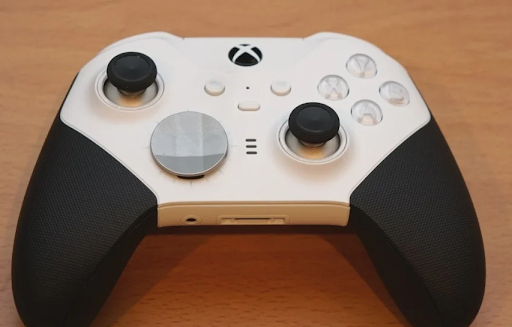
The Xbox Elite Wireless Controller Series 2 Core edition is the stripped-down version of the flagship Elite, and it’s a smart option for gamers who want Elite-tier features without paying the full $179.99 price tag. It retails around $129.99.
| Spec | Detail |
|---|---|
| Rear Paddles | 2 included (vs. 4 in full Elite) |
| Charging Dock | Not included |
| Interchangeable Components | Partial (no extra thumbstick set) |
| Connectivity | Xbox Wireless + Bluetooth |
| Price (MSRP) | ~$129.99 |
Best for: Mid-range buyers who want paddle support without the premium price.
You still get the adjustable hair trigger locks, rubberized grip, and the high-quality build of the Elite Series 2, just fewer included accessories. The charging dock and extra thumbstick kit are sold separately as a component pack.
One honest caveat: at the $129.99 price point, alternatives like the GameSir Kaleid offer similar paddle functionality and RGB customization at a lower cost. The Core edition’s advantage is the Microsoft ecosystem reliability and native Xbox warranty support. If brand trust and ecosystem integration matter to you, the Core is the best mid-range Xbox controller upgrade available.
4. Xbox Wireless Controller + USB-C Cable: Best Plug-and-Play Option
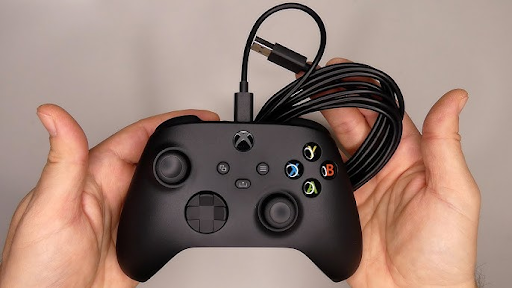
This bundle pairs the standard Xbox Wireless Controller with a 9-foot USB-C cable, giving you a wired gaming experience without buying a separate peripheral. It typically costs just $5–$10 more than the standalone wireless controller, making it one of the best Xbox controller deals available.
| Spec | Detail |
|---|---|
| Cable Included | 9-foot USB-C |
| Wired Latency | Lower than wireless |
| Battery Drain | Charges while playing |
| Connectivity | Wired + wireless |
| Price (MSRP) | ~$64.99 |
Best for: PC gamers, players who prefer zero wireless latency, households with shared setups.
The USB-C cable eliminates battery anxiety entirely, the controller charges while you play. For PC gamers especially, a wired connection also means zero driver headaches and instant plug-and-play recognition on Windows 10 and 11.
If wired gaming is your top priority and you’re open to a third-party option, the PowerA Fusion Pro 4 is worth a look, it’s a dedicated wired controller with programmable buttons at a competitive price. But for a simple, no-fuss best Xbox controller bundle, this USB-C package covers everything most players need.
5. Xbox Adaptive Controller: Best for Accessibility and Inclusive Gaming
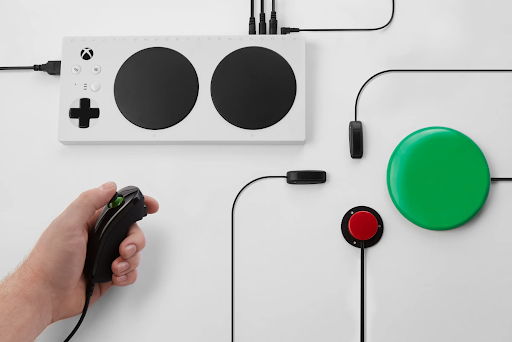
The Xbox Adaptive Controller is the best Xbox controller ever designed for players with limited mobility, disabilities, or non-standard physical needs. It’s not featured in most mainstream “top 10” roundups, but we’re including it here because it’s essential, not optional, when talking about the full Xbox controller lineup.
| Spec | Detail |
|---|---|
| External Input Ports | 19 3.5mm ports + 2 USB-A |
| Compatible Devices | Switches, buttons, joysticks, mounts |
| Co-Pilot Mode | Yes (pair with second controller) |
| Platform Support | Xbox + Windows PC |
| Price (MSRP) | ~$99.99 |
Best for: Gamers with disabilities, adaptive gaming setups, occupational therapists setting up accessible gaming environments.
The controller’s large programmable buttons map to A and B by default. The 19 3.5mm jacks accept external switches, foot pedals, sip-and-puff devices, and custom joysticks. Co-Pilot Mode lets two controllers share control of a single player, a feature no other Xbox controller offers.
Microsoft developed this with organizations like AbleGamers and SpecialEffect. It’s a landmark product in gaming accessibility. If you or someone you know needs adaptive input support, this is the definitive best Xbox controller for that use case, period.
6. Xbox Wireless Controller – Special Edition (Breaker & Camo Series): Best for Style-Conscious Gamers
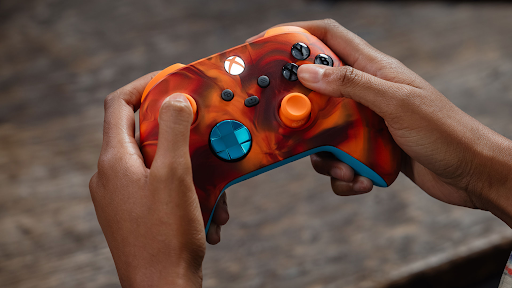
The Xbox Wireless Controller Special Edition lineup, including the Breaker and Camo series, delivers the same reliable performance as the standard controller in a more visually distinctive package. These are the best Xbox controller picks for gamers who want their setup to reflect their personality.
| Edition | Design | Price (MSRP) |
|---|---|---|
| Breaker Special Edition | Orange and black circuit pattern | ~$69.99 |
| Arctic Camo | White and gray camo | ~$69.99 |
| Daystrike Camo | Green and black camo | ~$69.99 |
Best for: Gift buyers, aesthetic-focused gamers, collectors.
Internals are identical to the standard Xbox Wireless Controller, same 40-hour battery, same Bluetooth + Xbox Wireless connectivity, same USB-C port. You’re paying a $10 premium over the base model for the finish and colorway. That’s a fair trade if you want something that looks sharp on a shelf or streaming setup.
Performance-wise, don’t expect any gaming advantage. These controllers shine as gifts and display pieces.
Breaker Special Edition vs. Arctic and Daystrike Camo: What’s Different?
The Breaker Special Edition uses a bold orange-and-black graphic overlay inspired by circuit board patterns, a strong aesthetic choice for tech-forward gamers. The Arctic Camo edition features a white-and-gray military camo texture, while the Daystrike Camo uses a green-and-black pattern more aligned with traditional camo aesthetics.
All three share identical internal hardware. The choice comes down entirely to visual preference. Breaker reads more urban and tech-inspired: the Camo variants lean into a more tactical, military-style look. Both Arctic and Daystrike Camo also feature textured surfaces on the grip areas, which provides a subtle tactile difference compared to the Breaker’s smoother finish.
How to Choose the Best Xbox Controller for Your Needs
Picking the best Xbox controller isn’t just about the highest specs, it’s about matching the controller to your specific play style, budget, and platform. Use this decision guide.
| Your Priority | Best Xbox Controller Pick |
|---|---|
| Overall performance + customization | Xbox Elite Wireless Controller Series 2 |
| Tight budget, everyday gaming | Xbox Wireless Controller (Standard) |
| Mid-range with paddle support | Xbox Elite Series 2 Core |
| Wired + zero battery hassle | Xbox Wireless Controller + USB-C Cable |
| Accessibility and adaptive inputs | Xbox Adaptive Controller |
| Aesthetics and gifts | Special Edition (Breaker or Camo) |
| Competitive/esports at the highest level | Razer Wolverine V3 Pro |
What to Look For Before You Buy
Connectivity: Most Xbox controllers support both Xbox Wireless and Bluetooth. If you game on PC and Xbox, confirm both are supported.
Battery life: The standard Xbox Wireless Controller and Elite Series 2 both offer up to 40 hours. AA batteries are used in the standard model, rechargeable packs or the Elite’s built-in battery are more convenient long-term.
Customization depth: Rear paddles, interchangeable thumbsticks, and trigger locks are Elite-only features. Casual gamers won’t miss them: competitive players will notice them immediately.
Drift resistance: Hall-effect stick technology (found in third-party options like the Razer Wolverine V3 Pro and GameSir Kaleid) resists stick drift over time, a known long-term issue with standard potentiometer sticks.
Platform compatibility: Every best Xbox controller listed here works on Xbox Series XS, Xbox One, and Windows PC. Most also support mobile gaming via Bluetooth.
Budget tiers at a glance:
- Under $70: Standard Xbox Wireless Controller or Special Editions
- $100–$130: Adaptive Controller, Elite Series 2 Core
- $150–$180: Elite Series 2 (full)
- $180+: Third-party competitive options
Conclusion
Every best Xbox controller on this list solves a different problem. The Elite Wireless Controller Series 2 is the best overall Xbox controller for most players. The standard Xbox Wireless Controller wins on value. The Adaptive Controller stands alone in the accessibility space. And if competitive esports performance is your benchmark, the Razer Wolverine V3 Pro is worth crossing over to.
Our recommendation: start with your budget and your play style. If you game casually a few hours a week, the $59.99 standard controller is more than enough. If you’re serious about competitive play or want full customization, invest in the Elite Series 2 or explore third-party alternatives. The best Xbox controller isn’t one-size-fits-all, but one of the six picks above will fit yours.
Frequently Asked Questions About Xbox Controllers
What is the best Xbox controller for competitive gaming in 2026?
The Razer Wolverine V3 Pro leads for competitive play due to superior Hall-effect stick technology, wireless latency, and customizable modules. The Xbox Elite Series 2 offers adjustable triggers and rear paddles but lags in responsiveness compared to the Razer option for esports-level performance.
Which Xbox controller offers the best value for casual gamers?
The standard Xbox Wireless Controller is the best value option at ~$59.99, delivering reliable performance, 40-hour battery life, and ergonomic comfort for everyday gaming. It supports Bluetooth and Xbox Wireless across Xbox consoles, PCs, and mobile devices without premium customization costs.
What does Hall-effect stick technology do and why does it matter?
Hall-effect sticks use magnets instead of physical contact points to detect position, eliminating stick drift over time—a common failure in standard controllers. The Razer Wolverine V3 Pro and GameSir Kaleid use this technology for superior durability and precision in competitive gaming.
Is the Xbox Adaptive Controller truly compatible with third-party accessibility devices?
Yes, the Xbox Adaptive Controller features 19 3.5mm input ports plus 2 USB-A ports that accept foot pedals, large-button switches, joysticks, sip-and-puff devices, and custom mounts. Co-Pilot Mode also allows two controllers to share control of one player, making it unmatched for inclusive gaming.
Can I use an Xbox controller with a wired connection on PC?
Yes. The Xbox Wireless Controller + USB-C Cable bundle (~$64.99) provides plug-and-play wired gaming on Windows 10 and 11 with zero driver headaches. Alternatively, the PowerA Fusion Pro 4 is a dedicated wired controller with programmable buttons at a competitive price.
What’s the difference between the Elite Series 2 and the Elite Series 2 Core?
The Core edition (~$129.99) strips down the full Elite (~$179.99) by including only 2 rear paddles instead of 4 and omitting the charging dock. Both feature adjustable hair triggers and rubberized grips, but the Core saves $50 for gamers who don’t need all accessories.