How to make a video game sounds huge until we break it into a few decisions you can actually act on this week. Most first-time developers do not fail because they lack talent. They fail because they start with a massive open-world RPG, buy ten tools, and never reach a playable build.
We can avoid that.
In this guide, we’ll walk through how to make a video game from idea to shared build using a beginner-friendly process: choose a small concept, pick tools that fit, plan the minimum version, prototype fast, add just-enough art and audio, then debug and export. If we stay focused on one finishable project, we learn faster, spend less, and get something real in players’ hands.
Choose A Small, Clear Game Idea You Can Actually Finish
When people ask how to make a video game, they usually picture story, graphics, code, music, menus, and marketing all at once. That is the trap. For a first project, the best idea is not the most original one. It is the smallest one that still feels fun.
A good beginner project usually has:
- One main mechanic
- One short play session, often 3–10 minutes
- One platform such as Windows PC or mobile
- Few content demands, like 3 levels instead of 30
- No online multiplayer
Strong first-project examples:
| Good beginner idea | Why it works |
|---|---|
| 2D endless runner | Simple loop, easy scoring, quick testing |
| Top-down shooter | Clear controls, enemy waves, small maps |
| Puzzle platformer | Few mechanics, level-based scope |
| Clicker or idle game | Easy systems, low art demands |
Weak first-project examples include open-world survival games, online battle games, and branching RPGs with 200 quests. Those projects can take teams 12–48 months.
If we want to learn how to make a video game fast, we should aim for a project we can prototype in 7 days and finish in 4-8 weeks.
Pick The Right Game Engine And Tools For Your First Project
The engine matters because it shapes how quickly we can turn an idea into a playable build. But there is no perfect engine. There is only the best fit for our genre, skill level, and target platform. This is the same approach used by top video game companies, which choose tools based on project needs rather than chasing trends or “best engine” debates.
For beginners learning how to make a video game, the right setup usually has three traits: low cost, strong tutorials, and fast iteration. We should also think about file size, hardware needs, asset store support, and scripting language.
A simple starter tool stack might look like this:
| Need | Beginner-friendly option |
|---|---|
| Engine | Godot, Unity, Construct 3 |
| Art | Aseprite, Piskel, Krita |
| Audio | Audacity, Bfxr, Freesound |
| Version control | GitHub Desktop |
| Task tracking | Trello, Notion, Google Docs |
Here is a practical rule: if we want 2D and a lighter learning curve, start with Godot or Construct 3. If we want broader job-market relevance, Unity is still a common choice in mobile, indie, and XR. If we want high-end 3D visuals and accept a steeper climb, Unreal makes sense.
The point is not to pick the “best” engine. The point is to keep moving. That is a core part of how to make a video game without getting stuck in research mode.
Compare Unity, Unreal, Godot, And No-Code Options
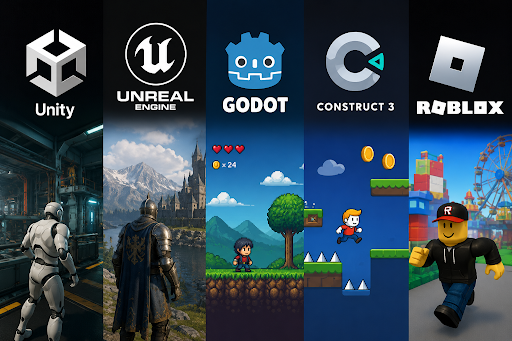
Here’s a direct comparison of the most common beginner choices.
| Engine | Best for | Language / system | Cost | Learning curve | Limits to know |
|---|---|---|---|---|---|
| Unity | 2D, 3D, mobile, VR | C# | Free tier available | Medium | Can feel heavy for tiny projects |
| Unreal Engine | High-fidelity 3D | C++, Blueprints | Free until revenue threshold | Medium-high | Bigger installs, more demanding hardware |
| Godot | 2D, lightweight indie projects | GDScript, C# | Free, open-source | Low-medium | Smaller asset ecosystem than Unity |
| Construct 3 / Buildbox | Fast prototypes, simple 2D | No-code / visual logic | Subscription varies | Low | Less flexible for larger systems |
| Roblox Studio | Social multiplayer experiments | Lua | Free | Low-medium | Platform-specific style and economy |
If we are brand new and want to understand how to make a video game with the least friction, Godot and Construct 3 are often the fastest starts. If we care about transferable programming experience, Unity gives us a lot of tutorials and C# practice. If our goal is a cinematic 3D action game, Unreal is stronger visually, but it asks more from us.
A useful test: download one engine, follow a 30-minute tutorial, and time how long it takes to move a character, detect collision, and export a build. The engine that gets us there fastest is usually the right one.
Plan Your Game Before You Build It
Planning saves weeks. Without it, we keep changing mechanics, adding features, and rebuilding levels. That is how a “small project” quietly turns into a 9-month unfinished folder.
When we study how to make a video game, planning should answer four questions:
- What does the player do every 10 seconds?
- What is the win or fail state?
- What must be built before anything else works?
- What can wait until version 1.1?
A simple pre-production checklist:
- Write the one-sentence game pitch
- Define the target player
- Choose platform: PC, browser, Android, iPhone
- Set a deadline, such as 30 days or 8 weekends
- List must-have features only
- Cut everything “nice to have”
Here’s a concrete example:
“A 2D sci-fi runner where the player jumps over drones, collects batteries, and survives 90 seconds.”
That pitch is useful because it gives us movement, enemies, collectibles, theme, and session length in one line.
If we want to finish, we should treat planning as a filter. Every feature must earn its place. That mindset is one of the least glamorous but most important parts of how to make a video game.
Create A Simple Game Design Document And Asset List
Our game design document does not need to be 40 pages. For a first game, 1–3 pages is enough if it is specific.
A simple GDD can include:
| Section | What to write |
|---|---|
| Core concept | One-sentence pitch |
| Genre | Platformer, shooter, puzzle, idle |
| Core loop | Move, collect, avoid, score, repeat |
| Controls | Keyboard, controller, touch |
| Win/fail state | Reach exit, survive timer, lose all health |
| Content scope | 3 levels, 5 enemies, 1 boss |
| Art direction | Pixel art, low-poly, flat UI |
| Audio | 8 SFX, 1 music loop |
Then make an asset list. This is where many first-time developers get surprised. A tiny game still needs a lot of parts.
Example asset list:
- Player sprite: idle, run, jump, hit
- 3 enemy sprites
- 1 tileset for terrain
- UI buttons: start, retry, quit
- Health bar and score label
- 8 sound effects
- 1 background music track
This step makes how to make a video game more concrete. Instead of “build my game,” we now have 25 visible tasks we can finish one by one.
Build A Playable Prototype And Test The Main Mechanic Early
The prototype is where the idea meets reality. A mechanic that sounds fun in a notebook can feel boring in 90 seconds. That is why the prototype comes before polished art, lore, menus, or monetization.
If we are serious about how to make a video game, the prototype should answer one question: Is the main action fun enough to repeat?
For example:
- In a platformer, test jump height, air control, and landing feel
- In a shooter, test aiming, hit feedback, and enemy speed
- In a puzzle game, test whether the rule is clear in under 20 seconds
A good first prototype includes only:
- Player movement
- One interaction or attack
- One obstacle, enemy, or puzzle rule
- One fail state
- One restart flow
Use placeholder assets. Gray boxes are fine. Colored squares are fine. The point is speed.
A practical 3-day prototype schedule:
| Day | Goal |
|---|---|
| Day 1 | Movement, camera, collision |
| Day 2 | Main mechanic, fail state, restart |
| Day 3 | 3–5 quick playtests and notes |
Then test with real people. Ask them two things only: “What felt good?” and “Where did you get confused?” Their first 60 seconds tell us more than 6 hours of solo guessing.
One uncommon but powerful trick: record a silent screen capture of each tester’s session. Watching where they hesitate, backtrack, or ignore UI gives us clean data. In one 10-minute test, we might spot that 4 of 5 players miss the jump cue or never notice the battery collectible. That is specific, fixable feedback.
This is the stage where how to make a video game becomes less about inspiration and more about iteration.
Make The Art, Sound, And User Interface Good Enough To Play
A first game does not need amazing art. It needs readable art. Players should know what they can jump on, what hurts them, where to click, and when they succeeded.
When people learn how to make a video game, they often over-invest in visuals too early. But clear communication beats visual ambition.
Focus on three quality targets:
Readable Art
Use strong contrast and consistent shapes. If spikes are red triangles in level 1, keep them red triangles everywhere. If platforms are solid blue rectangles, do not turn them into decorative clouds in level 2.
Useful Sound
Sound effects improve feedback fast. A jump sound, hit sound, pickup chime, and button click can make a rough build feel 50% more responsive. Free tools like Audacity and Bfxr help here.
Clear UI
UI should answer: health, score, ammo, timer, pause, and next step. Keep labels large and obvious. On a 1080p screen, tiny 12px text often fails. Test with 24px or larger for key HUD elements.
Here is a smart “good enough” standard:
| Element | Good enough for version 1 |
|---|---|
| Character art | 4–6 animations or even 2-frame loops |
| Enemies | Distinct silhouette and color |
| UI | Start, pause, restart, settings |
| Audio | 5–10 SFX, 1 looped track |
| Effects | Basic particles for hit, jump, pickup |
A standout tip that many articles skip: create a visual priority map. Rank every screen element as primary, secondary, or decorative. Health bar and hazards are primary. Background trees are decorative. This keeps us from spending 3 hours on fog effects while the restart button is still hard to find.
That is a practical, production-minded part of how to make a video game.
Debug, Polish, Export, And Share Your Game
Finishing is a skill. Many projects reach 80% and stay there because the last stretch feels messy: bugs, edge cases, menus, build settings, device tests, and player feedback.
To finish how to make a video game the right way, we should move through four passes.
1. Debug
Fix crashes, broken collisions, input bugs, and soft locks first. If the player can fall through the floor or get stuck in a menu, polish does not matter.
2. Polish
Add small improvements that increase clarity and feel:
- Screen shake on impact
- Better jump timing
- Hit flashes
- Faster restart time
- Shorter load screens
3. Export
Create builds for the target platform only. If we started for Windows PC, ship Windows PC first. In Unity, Unreal, and Godot, platform export settings affect resolution, input mapping, compression, and performance.
4. Share
Use places where beginners can publish quickly:
- itch.io for fast indie uploads
- Steam for broader reach, if we are ready for store setup and fees
- Google Play or App Store for mobile
- Roblox for platform-native social games
A practical launch checklist helps:
| Task | Done? |
|---|---|
| Test on target device | |
| Check frame rate stability | |
| Confirm audio levels | |
| Verify save/load if used | |
| Add title screen and credits | |
| Write store description and screenshots |
One high-value step that stands out: track the first-failure point after release. If 37% of players quit on level 2 or during the tutorial, that data tells us exactly where to improve. Even a tiny game can use simple analytics, session recordings, or manual feedback forms.
That is the final lesson in how to make a video game: shipping teaches more than endless planning. A finished small game beats an unfinished dream project every time.
We started with a simple question, how to make a video game, and turned it into a workable path: choose a small idea, define the loop and scope, pick tools that fit, plan the build, prototype early, add readable art and sound, then debug, export, and share. That process works because it reduces risk at every step.
If we want real progress, we should choose one concept today and build the smallest playable version by the end of the week. The first game does not need to be big. It needs to be finished. Once we ship one complete project, the next one gets faster, smarter, and far more ambitious.
How to Make a Video Game: Frequently Asked Questions
1. What is the best way for beginners to start making a video game?
Ans. Beginners should start with a small, clear game idea that is easy to finish, such as a 2D endless runner or puzzle platformer. Focusing on one main mechanic, a short play session, and a single platform helps ensure completing the project quickly.
2. Which game engines are suitable for first-time game developers?
Ans. Popular beginner-friendly engines include Godot and Construct 3 for simple 2D games with low learning curves, Unity for broader skill development with C#, and Unreal for high-end 3D projects. Choose based on your goals, skill level, and target platform.
3. How important is planning before building a game?
Ans. Planning is crucial to avoid scope creep and wasted effort. Creating a concise game design document outlining the core concept, mechanics, platform, and must-have features helps keep the project focused and finishable within weeks.
4. What should be included in a simple game design document (GDD)?
Ans. A basic GDD includes the core concept, genre, gameplay loop, controls, win/fail states, content scope (levels, enemies), art style, and audio requirements. This helps organize development and asset creation efficiently.
6. How can I prototype my game effectively?
Ans. Build a playable prototype early by focusing on core mechanics like player movement, one interaction or obstacle, and fail states. Use placeholder art to speed up development, and test frequently to ensure the main action is fun and clear.
7. Where can I share and publish my finished game?
Ans. Beginner developers can quickly publish on platforms like itch.io for indie games or Roblox for social multiplayer formats. For broader reach, consider Steam or mobile app stores, but be ready for additional setup and fees.