
Basecamp has been a fixture in the project management software landscape since its launch in 2004. Over two decades later, it remains one of the most recognized names in team collaboration tools, consistently highlighted in Basecamp reviews for its simplicity and reliability. But the space has evolved dramatically, with platforms like ClickUp, Notion, Monday.com, and Asana adding AI features, deep automations, and granular customization. So where does Basecamp stand today?
This Basecamp reviews guide pulls together verified user feedback from G2, Capterra, and other independent sources, along with hands-on analysis of Basecamp’s features, pricing, and overall value in 2026. Whether you’re evaluating it for the first time or reconsidering your current subscription, this guide covers everything you need to make an informed decision.
|
Quick Verdict Basecamp is a reliable, opinionated collaboration hub best suited for small to |
What Is Basecamp?
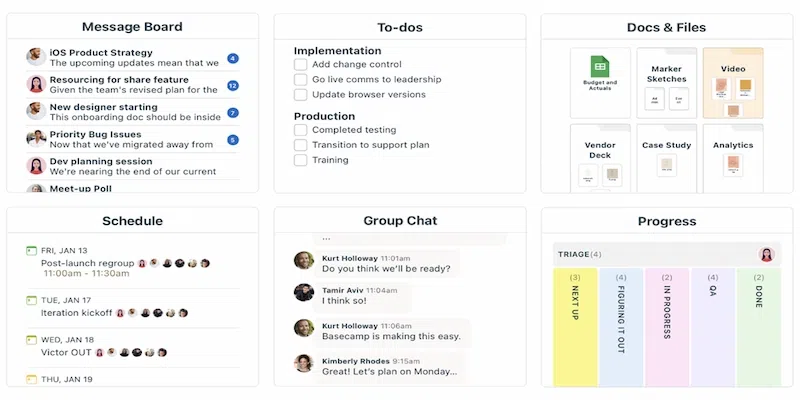
Basecamp is a project management
and team collaboration platform developed by 37signals, a company co-founded in
1999 by Jason Fried, Carlos Segura, and Ernest Kim. The product was first
launched in 2004 and has gone through several major iterations, with the
current version often referred to as Basecamp 4.
Unlike enterprise-grade project
management tools, Basecamp is intentionally simple. It positions itself as a
central hub where teams can manage tasks, share files, communicate, and
schedule work without the overhead of complex workflows. This philosophy of
‘less software’ has attracted a loyal following, particularly among agencies,
remote teams, and small businesses.
As of 2026, Basecamp has not
introduced major transformative features such as generative AI tools or
advanced automation, a deliberate choice by 37signals that aligns with their
product philosophy but increasingly contrasts with competitor offerings.
Basecamp Reviews and Pricing in 2026
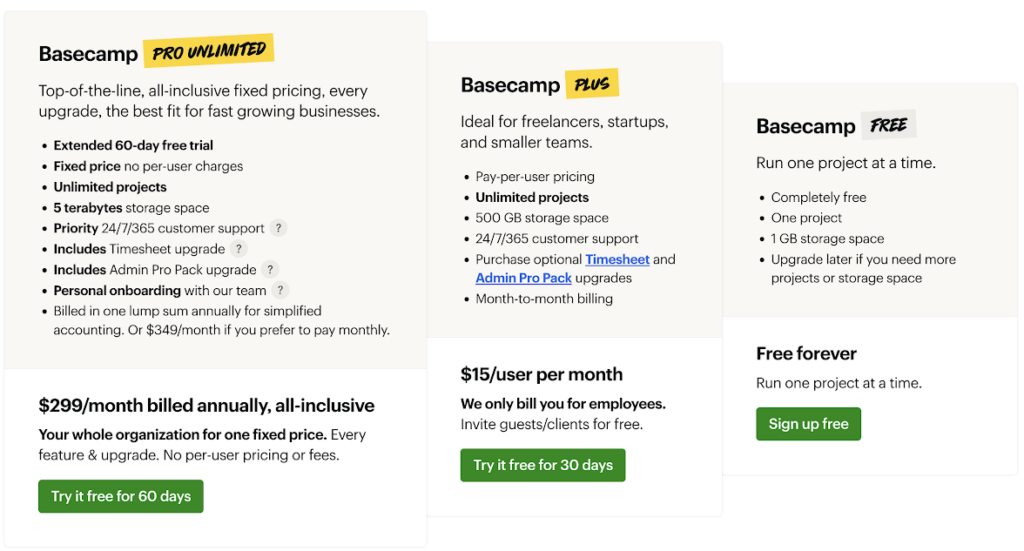
Basecamp offers a straightforward
three-tier pricing structure. Below is a breakdown based on publicly available
information:
|
Plan |
Price |
Users |
Projects |
Storage |
Best For |
|
Free |
$0/month |
Up to 20 |
1 project |
1 GB |
Individuals |
|
Plus |
$15/user/month |
Unlimited |
Unlimited |
500 GB |
Small and |
|
Pro Unlimited |
$299/month |
Unlimited |
Unlimited |
5 TB |
Agencies and |
* Pricing verified from publicly available sources as of early 2026. Always confirm current rates on the official Basecamp website before making a purchasing decision.
* The Pro Unlimited plan includes Timesheet and Admin Pro Pack add-ons at no extra cost. These are available as paid add-ons for Plus plan subscribers.
|
Cost Consideration The break-even point between Plus and Pro Unlimited is typically around 20 users. |
Core Features of Basecamp
Basecamp bundles several
collaboration tools into a single platform. Here is a breakdown of its main
features:
1. To-Do Lists
To-do lists are central to
Basecamp’s task management system. You can create multiple lists within a
project, assign tasks to team members, set due dates, and add comments directly
on individual tasks. Recurring tasks are also supported, which is useful for
teams managing regular processes such as weekly check-ins or monthly reports.
2. Message Boards
Message boards serve as the structured
communication channel within Basecamp. Unlike real-time chat, message boards
are designed for asynchronous updates, announcements, and discussions that need
to be organized by topic. All team members can post, comment, and receive
notifications, which generally reduces reliance on email threads.
3. Campfire Chat
Campfire is Basecamp’s built-in
real-time group chat feature. It is project-specific and supports text, emoji,
and file attachments. While it covers basic chat needs, it does not match the
depth of dedicated messaging platforms like Slack, and individual conversations
cannot be linked directly to specific tasks.
4. Card Table (Kanban View)
The Card Table is Basecamp’s
Kanban-style board, introduced in a previous major update. Cards can be moved
through columns as tasks progress through different stages. You can assign team
members, add comments, and place cards on hold. It is relatively
straightforward but lacks features like swimlanes or nested cards.
5. Docs and Files
The Docs and Files section allows
teams to upload and organize documents, images, and external links (to Google
Drive, Figma, Dropbox, and similar tools). Files are project-specific, meaning
there is no cross-project library. Version history is limited; while you can
upload multiple versions, Basecamp does not provide a diff view or detailed
version comparison, which may create friction for design or legal teams.
6. Schedule
Basecamp’s scheduling tool
combines calendar events and to-do deadlines in a single view. Project members
can create events, set reminders, and receive notifications. It offers a simple
overview but is generally not a replacement for dedicated calendar tools when
complex scheduling is required.
7. Check-ins
Check-ins are automated recurring
questions sent to team members at set intervals. Responses are compiled into a
single thread, making it easier to spot blockers or gather progress updates
without holding meetings. This is a standout feature for async-first teams and
remote organizations.
8. Hill Charts
Hill Charts are a visual progress
tracking tool unique to Basecamp. Tasks are plotted on a hill-shaped curve to
show whether they are in the problem-solving phase (climbing) or the execution
phase (descending). This provides a qualitative view of project momentum that
differs from typical percentage-based progress bars.
9. The Lineup
The Lineup gives a high-level view
of all active projects, showing start and end dates across a timeline. It is
useful for getting a quick sense of team workload and project overlap, though
it does not support the dependency tracking or critical path analysis found in
tools like Asana or Smartsheet.
10. Pings
Pings are Basecamp’s private
direct messaging feature. In a June 2024 update, named conversations were added
to Pings, making it easier to find and organize specific chats. This is a
quality-of-life improvement, though it still remains separate from the broader
task management system.
Basecamp Reviews: What People Are Saying in 2026
Across major review platforms
including G2 and Capterra, Basecamp maintains consistently positive ratings for
ease of use and team communication, with recurring critiques around advanced
feature limitations.
|
Review |
Overall |
Ease of Use |
Features |
Value for |
|
G2 |
4.1 / 5 |
4.3 / 5 |
3.8 / 5 |
4.1 / 5 |
|
Capterra |
4.3 / 5 |
4.4 / 5 |
4.0 / 5 |
4.2 / 5 |
|
GetApp |
4.3 / 5 |
4.4 / 5 |
3.9 / 5 |
4.2 / 5 |
* Ratings are approximate and sourced from publicly available review aggregators. These may change over time.
What Users Like?
Here’s a quick look at the features and aspects users appreciate most about Basecamp:
- Clean, uncluttered interface that is easy to learn with minimal training
- Flat-rate pricing on the Pro Unlimited plan is budget-friendly as teams grow
- Consolidates chat, tasks, and files into a single workspace, reducing tool sprawl
- Hill Charts offer a unique and useful perspective on project progress
- Check-ins reduce meeting frequency for distributed and async-first teams
- Strong client management features with controlled visibility into project spaces
- Stable product with consistent performance and no frequent disruptive UI changes
Common User Complaints
The most common drawbacks and limitations users mention in their reviews of Basecamp.
- No native Gantt charts or task dependency management
- Limited reporting and analytics compared to competitors
- No built-in generative AI features as of 2026
- Customization options are restricted; complex or branching workflows can feel limiting
- Notification management can become overwhelming on large or active projects
- No native time tracking on the basic Plus plan (available as a paid add-on or included in Pro Unlimited)
- Sub-tasks are not supported, which can complicate layered project structures
- File version control is minimal, which may frustrate design or document-heavy teams
|
Real User Voice “We’ve used Basecamp for over a year across our 10-person marketing team. It’s |
Basecamp Pros and Cons at a Glance
Here’s a quick summary of Basecamp’s key strengths and weaknesses to help you evaluate it at a glance.
|
Pros |
Cons |
|
Intuitive and |
No Gantt |
|
Flat-rate |
No built-in |
|
Reduces email |
Limited |
|
Unique tools: |
No native |
|
Strong client |
Minimal file |
|
iOS and |
No built-in |
|
GDPR |
Reporting and |
Who Is Basecamp Best For?
Basecamp tends to work best in specific organizational contexts.
It is generally a strong fit for:
- Freelancers and independent consultants managing client projects
- Small to mid-sized agencies coordinating work with clients and contractors
- Remote or distributed teams that need an async-friendly workspace
- Startups and growing businesses looking to consolidate multiple tools into one
- Teams transitioning away from email-heavy communication workflows
It is generally less suited for:
- Enterprises requiring granular role-based permissions and advanced security controls
- Teams with highly complex, phased projects needing dependency management
- Data-driven managers who rely on detailed analytics and reporting
- Organizations already invested in AI-enhanced workflows
- Teams needing deep integration ecosystems beyond what Basecamp currently supports
Basecamp Integrations
Basecamp supports a moderate range
of third-party integrations. Native connections allow you to link external
files from Google Drive, Dropbox, and Figma within the Docs and Files section.
For more extensive integrations, Basecamp connects with Zapier and Make
(formerly Integromat), which open up hundreds of additional automation
possibilities with other software tools.
However, compared to platforms
like Monday.com or ClickUp, Basecamp’s native integration library is relatively
limited. Teams that rely on specialized tools such as CRM software, advanced
analytics dashboards, or time-tracking platforms may need to rely on
third-party automation services to bridge the gap.
Basecamp vs. Top Alternatives (2026
Comparison)
To put Basecamp’s position in
context, here is how it compares to several popular alternatives across key
criteria:
|
Feature |
Basecamp |
Asana |
Monday.com |
ClickUp |
Notion |
|
Gantt Charts |
No |
Yes |
Yes |
Yes |
Limited |
|
Task |
No |
Yes |
Yes |
Yes |
No |
|
Built-in AI |
No |
Yes |
Yes |
Yes |
Yes |
|
Native Time |
Add-on |
No (3rd |
Yes (some |
Yes |
No |
|
Kanban View |
Yes (Card |
Yes |
Yes |
Yes |
Yes |
|
Client Access |
Yes (free) |
Limited |
Yes |
Yes |
Limited |
|
Flat-Rate |
Yes (Pro |
No |
No |
No |
No |
|
Free Plan |
Yes (1 |
Yes |
Yes |
Yes |
Yes |
|
Reporting/Analytics |
Basic |
Advanced |
Advanced |
Advanced |
Moderate |
* Feature availability may vary by pricing plan. Always verify on each vendor’s official website before making a decision.
|
Key Takeaway on Alternatives If your team needs Gantt charts, dependency tracking, or AI-enhanced project management, platforms like Asana, Monday.com, or ClickUp are likely better fits. If you prioritize simplicity, flat-rate pricing, and a centralized hub for communication and light project management, Basecamp remains a strong contender. |
Security and Data Privacy
Basecamp takes a reasonably strong
approach to data security. Key security features include:
- Data encryption in transit and at rest
- Two-factor authentication (2FA) for account security
- GDPR compliance for users in applicable regions
- Regular backups and data redundancy
Basecamp does not publicly claim
advanced enterprise-grade compliance certifications such as SOC 2 Type II or
ISO 27001, which may be a consideration for organizations in regulated
industries. For teams requiring stricter compliance frameworks, it is advisable
to verify current certifications directly with 37signals before committing.
Is Basecamp Worth It in 2026?
The answer depends on what your team needs. Basecamp continues to be a well-built, reliable product for teams that want a straightforward, centralized workspace without the complexity of enterprise project management software.
For teams that have outgrown email but do not yet need advanced automation, dependency mapping, or AI-assisted planning, Basecamp typically delivers solid value. As reflected in many Basecamp reviews, its simplicity and ease of use remain key strengths. Its flat-rate Pro Unlimited pricing model is particularly compelling for organizations with 20 or more users, where per-user SaaS pricing can add up quickly.
However, the product’s deliberate simplicity is also its main limitation. As competitors continue to add AI tools, deeper automation, and richer reporting, Basecamp’s feature gap may widen for teams with more complex needs.
In short: Basecamp is worth it if simplicity, reliability, and flat-rate pricing matter to your team. It is less worth it if you need feature depth, AI tools, or sophisticated project tracking.
Tips for Getting the Most Out of Basecamp
If you decide Basecamp is the
right tool, these practices can help your team use it more effectively:
- Start with one team or project before rolling out company-wide. Phased adoption generally leads to better long-term adoption rates.
- Turn off email notifications and manage alerts within the platform to prevent inbox overload.
- Use Message Boards for structured discussions and reserve Campfire for informal, real-time exchanges.
- Assign an internal Basecamp champion to answer questions and guide colleagues during onboarding.
- Set up client access with carefully configured visibility settings before inviting external stakeholders.
- Use Check-ins strategically to replace status update meetings and keep async communication flowing.
Frequently Asked Questions About Basecamp Reviews
1. Is Basecamp free to use?
Ans. Basecamp offers a free plan that
is limited to one active project and up to 20 users with 1 GB of storage. It is
generally suitable for testing the platform but not for ongoing team use across
multiple projects.
2. How much does Basecamp cost per month?
Ans. Basecamp Plus is priced at $15 per
user per month. The Pro Unlimited plan costs $299 per month when billed
annually or $349 per month on a monthly basis, covering unlimited users and
projects. Only full employees are billed; clients and contractors can typically
be added at no extra cost.
3. Does Basecamp have a mobile app?
Ans. Yes. Basecamp offers dedicated
apps for both iOS and Android, giving users access to core features including
tasks, messages, files, and chat on mobile devices.
4. What do Basecamp reviews say about the platform?
Ans. Most Basecamp reviews highlight its ease of use, simple interface, and strong team communication features. However, users also note limitations in advanced project management features, customization, and built-in AI tools.
5. Can clients access Basecamp projects?
Ans. Yes. Basecamp allows you to invite
clients to specific projects with controlled visibility. You can determine what
clients can see and contribute to, which makes it a practical option for
agencies and consultants managing external stakeholders.
6. Does Basecamp offer time tracking?
Ans. Basic time tracking (Timesheet) is
included in the Pro Unlimited plan. For Plus plan subscribers, it is available
as a paid add-on. There is no built-in automatic time tracking with real-time
monitoring.
7. How does Basecamp compare to Slack?
Ans. Basecamp and Slack serve different
primary purposes. Slack is primarily a messaging and communication platform
with deep integration capabilities. Basecamp is a broader project management
and collaboration hub with built-in messaging (Campfire and Pings) as one
component. Teams often choose Basecamp specifically to consolidate tools and
move away from reliance on Slack plus separate PM software.
8. Is Basecamp suitable for large enterprises?
Ans. Basecamp is generally better
suited for small to mid-sized teams. While the Pro Unlimited plan can
accommodate large user counts, the platform lacks the granular permissions,
compliance certifications, and advanced reporting that enterprise organizations
typically require. Larger teams with complex needs may find tools like Wrike,
Microsoft Project, or Smartsheet more appropriate.
Key Takeaways
|
Summary: Basecamp Reviews 2026
|
Conclusion
After all these years, Basecamp still does what it was designed to do, and it does it reliably. The platform offers a clean, cohesive workspace that brings together task management, team communication, file sharing, and scheduling under one roof. For teams exploring the best team collaboration tools, Basecamp remains a worthwhile option in 2026.
That said, the project management software landscape has moved quickly. Competitors have added features at a pace that Basecamp has not matched by design. Teams with complex workflows, a need for AI assistance, or a reliance on deep analytics may find that the platform’s intentional simplicity becomes a constraint over time.
Ultimately, the best way to evaluate Basecamp is to test it against your team’s specific workflow. As reflected across many Basecamp reviews, the platform’s strengths and limitations become most apparent in real-world use. The free plan, while limited to one project, provides enough exposure to determine whether the platform’s approach fits your working style. For growing teams already considering the Pro Unlimited tier, the value proposition is particularly strong if the headcount math supports it.
Basecamp is not the most feature-rich tool in its category, but it may still be the right tool for your team in 2026.