If you’ve spent any time managing projects with a distributed team, chances are you’ve heard of Asana. Since its launch in 2012, Asana has grown into one of the most widely used project and team management platforms in the world, serving over 150,000 organizations across industries.
But if you’ve been browsing asana reviews online, you’ve probably noticed mixed opinions depending on team size, use case, and budget. With so many project management tools competing for attention, Monday.com, Trello, ClickUp, Notion, and others the real question is: does Asana actually deserve its reputation?
This in-depth asana reviews guide covers everything you need to make an informed decision: its core features, pricing, real user feedback, pros and cons, and how it stacks up against top competitors.
What Is Asana?
Asana is a cloud-based work and project management platform designed to help teams organize tasks, track progress, manage deadlines, and collaborate, all in one place.
At its core, Asana allows teams to break down work into tasks and subtasks, assign ownership, set due dates, and monitor progress across multiple projects simultaneously. Many asana reviews highlight that it goes far beyond a simple to-do list, offering workflow automation, reporting dashboards, goal tracking, and integrations with hundreds of third-party tools.
Who Is Asana Best For?
Based on most asana reviews, the platform is well-suited for:
- Marketing teams managing campaigns, content calendars, and launches
- Product and engineering teams running sprints and tracking deliverables
- Operations teams coordinating cross-functional processes
- Remote and hybrid teams that need centralized task visibility
- Agencies and consultants managing multiple client projects
It may be less ideal for very small solo operations or teams looking for a lightweight, minimalist tool in those cases, simpler alternatives like Todoist or Trello might feel more appropriate.
Asana Core Features
Based on insights from multiple asana reviews, its core features are designed to streamline team collaboration, improve visibility, and simplify complex project workflows. From task management to automation and AI capabilities, Asana offers a well-rounded feature set for modern teams.
Task and Project Management
Asana’s foundation is its task management system. You can create tasks, add descriptions, attach files, leave comments, set priorities, and assign them to specific team members. Tasks can be grouped into projects, and each project can be viewed in multiple formats — List, Board (Kanban), Timeline (Gantt), and Calendar views.
Subtasks allow you to break down complex work into smaller steps, and tasks can belong to multiple projects simultaneously, which is especially useful for cross-functional work.
Multiple Project Views
One of Asana’s standout features is its flexibility in how you visualize work:
- List View – A clean, structured view ideal for task-heavy projects
- Board View – A Kanban-style drag-and-drop interface for visual workflows
- Timeline View – A Gantt-chart style view for mapping dependencies and deadlines (available on paid plans)
- Calendar View – Useful for scheduling and deadline management
- Workload View – Shows team capacity and helps managers avoid over-assigning (available on higher-tier plans)
Workflow Automation (Rules)
Asana’s automation feature, called Rules, allows teams to trigger automatic actions based on conditions. For example: “When a task is marked complete, notify the project manager and move it to the Done section.” This can significantly reduce manual work and the chance of tasks falling through the cracks.
On paid plans, you can create custom multi-step rules, and Asana also offers pre-built templates for common automation scenarios.
Goals and Portfolios
On Business and higher plans, Asana offers Goals a feature that lets you connect team tasks and projects to broader company objectives. This is particularly valuable for OKR-driven organizations that want visibility into how day-to-day work maps to strategic outcomes.
Portfolios allow managers to get a high-level overview of multiple projects at once, making it easier to spot risks and track overall progress across departments or teams.
Reporting and Dashboards
Asana includes built-in reporting tools that let you create visual dashboards showing task completion rates, project status, workload distribution, and more. Custom charts can be built using saved searches and filters, and these dashboards can be shared across teams.
Integrations
Asana integrates with over 300 tools, including:
- Communication: Slack, Microsoft Teams, Zoom
- File Storage: Google Drive, Dropbox, OneDrive, Box
- Development: GitHub, GitLab, Jira
- CRM and Sales: Salesforce, HubSpot
- Productivity: Google Workspace, Microsoft 365, Notion
- Automation: Zapier, Make (formerly Integromat)
There is also an Asana API available for teams that want to build custom integrations.
Asana Intelligence (AI Features)
Asana has introduced AI-powered features under the “Asana Intelligence” umbrella, including smart summaries, status updates, and task prioritization suggestions. These features are gradually rolling out across plans and aim to reduce the time teams spend on administrative project management work.
Asana Pricing Plans
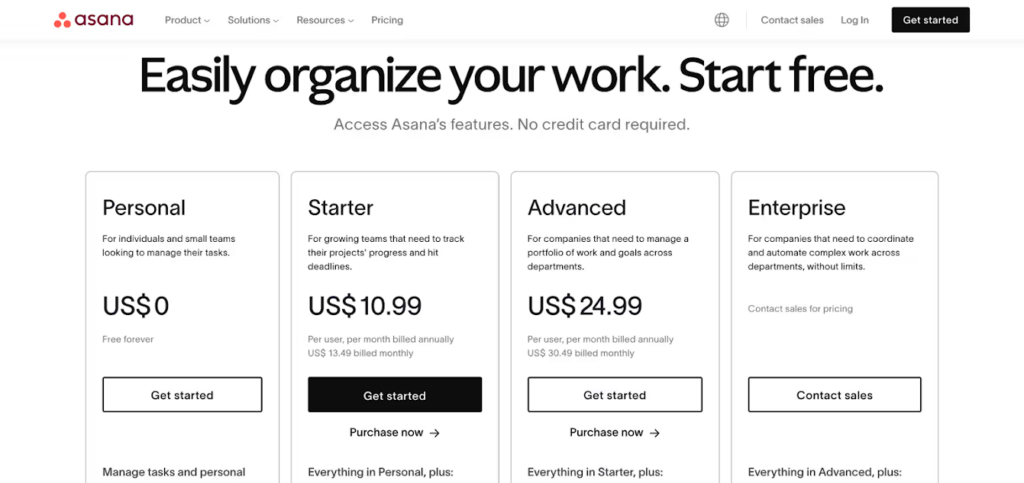
Asana offers four main pricing tiers:
| Plan | Price (per user/month, billed annually) | Best For |
| Personal | Free | Individuals and small teams (up to 10 users) |
| Starter | ~$10.99 | Small teams needing more features |
| Advanced | ~$24.99 | Growing teams needing automation and reporting |
| Enterprise | Custom pricing | Large organizations with advanced security needs |
| Enterprise+ | Custom pricing | Highly regulated industries requiring maximum control |
Free Plan Highlights: Unlimited tasks and projects, basic views (List, Board, Calendar), integrations, and collaboration for up to 10 users making the asana free plan a strong option for small teams just getting started.
Paid Plan Additions: Timeline view, Gantt charts, advanced automation, custom rules, reporting dashboards, Portfolios, Goals, and priority support.
Note: Pricing may vary and is subject to change. It’s recommended to verify current pricing directly on Asana’s official website.
Asana Pros and Cons
When analyzing asana reviews, the pros and cons section gives a balanced view of where Asana excels and where it may fall short. Understanding these strengths and limitations can help you decide if it’s the right fit for your team’s workflow.
Pros
- Intuitive and clean interface – Asana is widely praised for its polished, user-friendly design that doesn’t require extensive onboarding
- Versatile project views – The ability to switch between List, Board, Timeline, and Calendar views in the same project is a major productivity advantage
- Powerful automation – The Rules feature can meaningfully reduce manual work for recurring processes
- Strong integrations ecosystem – Over 300 integrations make it easy to fit Asana into existing workflows
- Robust free plan – The Personal tier is generous compared to many competitors, supporting up to 10 users
- Excellent mobile apps – Both iOS and Android apps are well-rated and functional
- Goal and portfolio tracking – Helpful for organizations that want to align operational work with strategic objectives
Cons
- Cost can add up quickly – Advanced features are locked behind higher tiers, and pricing per-seat can become expensive for larger teams
- Learning curve for advanced features – While basic use is straightforward, features like automation rules and portfolios may take time to master
- No built-in time tracking – Asana does not include native time tracking; you need a third-party integration for this
- No built-in chat – Unlike some competitors, Asana lacks native real-time messaging, requiring integration with Slack or Teams
- Subtask visibility – Subtasks can sometimes feel buried or disconnected from parent tasks, which may cause confusion in complex projects
- Workload and reporting views – These are only available on higher-tier plans, which limits access for smaller teams on the Starter plan
Asana Reviews: What Real Users Are Saying About Asana
Across major review platforms, G2, Capterra, Trustpilot, and the App Store, Asana generally receives strong ratings, though with consistent patterns in both praise and criticism.
- G2 Rating: Approximately 4.3 out of 5 (based on thousands of reviews)
- Capterra Rating: Approximately 4.5 out of 5
Common Praise from Users:
Across multiple asana reviews, users frequently highlight the platform’s ease of use, strong automation, and ability to streamline team workflows.
- Teams consistently highlight how easy it is to get started and assign tasks
- Marketing and operations teams frequently mention that Asana replaced multiple tools in their workflow
- Many users appreciate the visual clarity of the Timeline view for deadline management
- Reviewers often note that the automation features saved significant time on recurring workflows
Common Complaints from Users:
At the same time, asana reviews also point out concerns around pricing, notification overload, and a few missing advanced features.
- Several users mention that the pricing jump between Starter and Advanced is steep, especially for small teams
- A recurring complaint is that notifications can become overwhelming, particularly on larger projects
- Some users find that the mobile app, while functional, lacks some of the features available on desktop
- A number of reviews mention that managing dependencies in complex, multi-team projects can feel cumbersome
Overall, the sentiment in Asana reviews tends to be positive, with most criticism directed at pricing and a handful of feature gaps rather than fundamental problems with the product.
Asana vs. Competitors: How Does It Compare?
When comparing tools side by side, asana reviews often highlight how it stacks up against top competitors in terms of features, usability, and overall value. This comparison helps clarify which platform best fits different team needs and workflows.
Asana vs. Monday.com
Monday.com offers a more visually customizable interface and includes native time tracking, which Asana lacks. However, Asana generally provides a more structured project management approach that many teams find easier to standardize. Monday.com’s free plan is more limited, while Asana’s free tier is more generous for small teams. Pricing at scale is similar across both platforms.
Asana vs. ClickUp
ClickUp is often cited as a feature-rich alternative to Asana, offering native time tracking, docs, whiteboards, and more often at a lower price point. However, ClickUp’s density of features can lead to a steeper learning curve and interface complexity. Asana tends to win on simplicity, polish, and reliability, while ClickUp appeals to teams that want everything in one place.
Asana vs. Trello
Trello is a much simpler, Kanban-focused tool that is ideal for smaller teams or basic project tracking. Asana is significantly more powerful, offering multiple views, automation, goals, and reporting that Trello doesn’t natively support. Trello may be sufficient for straightforward workflows, but teams with complex project management needs typically outgrow it quickly.
Asana vs. Notion
Notion is primarily a documentation and knowledge management tool that also offers basic database-style project tracking. It’s highly flexible but not a dedicated project management solution. Asana is the stronger choice for structured task management, workflow automation, and team accountability, while Notion tends to win for teams that prioritize documentation and wikis alongside lightweight task tracking.
Quick Comparison Table
| Feature | Asana | Monday.com | ClickUp | Trello | Notion |
| Free Plan | Yes (up to 10 users) | Yes (limited) | Yes | Yes | Yes |
| Kanban View | Yes | Yes | Yes | Yes | Yes |
| Gantt/Timeline View | Paid plans | Paid plans | Paid plans | Via Power-Up | Limited |
| Native Time Tracking | No | Yes | Yes | No | No |
| Automation | Yes | Yes | Yes | Limited | Limited |
| Goal Tracking | Paid plans | Limited | Yes | No | No |
| Built-in Chat | No | No | Yes | No | No |
| Ease of Use | High | Medium-High | Medium | Very High | Medium |
| Best For | Structured team PM | Visual workflows | All-in-one | Simple Kanban | Docs + tasks |
Is Asana Worth the Price?
For teams that primarily need structured task management, workflow automation, cross-functional visibility, and strong integrations, Asana generally offers solid value particularly at the Starter tier. The free Personal plan is one of the more capable free offerings in the project management space.
The Advanced plan becomes more justifiable when teams need Timeline views, Workload management, and more sophisticated automation. However, teams on tighter budgets may find that alternatives like ClickUp offer a comparable or broader feature set at a lower price point.
For enterprise organizations prioritizing security, compliance, and admin controls, Asana’s Enterprise plans are competitive, though pricing requires direct discussion with their sales team.
Asana Customer Support
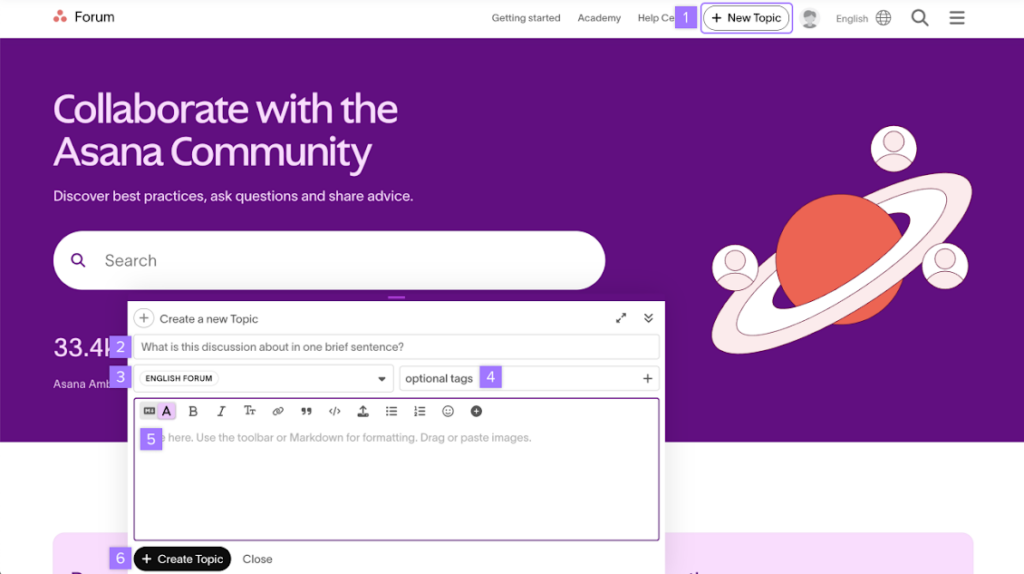
Asana offers several support channels:
- Help Center – An extensive library of articles, guides, and video tutorials
- Community Forum – An active user community for peer-to-peer support
- Email Support – Available across all paid plans
- Priority Support – Available on Business and Enterprise plans
- Dedicated Customer Success Manager – Available on Enterprise plans
The general consensus among users is that Asana’s self-service documentation is strong, though response times for direct support can vary depending on the plan level.
Conclusion
Based on its feature set, user feedback, and insights gathered from various asana reviews, Asana is a genuinely capable and well-designed team management platform that performs strongly for most mid-sized teams and organizations. Its intuitive interface, flexible project views, solid automation, and extensive integrations make it a reliable choice for marketing, operations, product, and cross-functional teams.
That said, it may not be the single best option for every scenario. Teams that need built-in time tracking, native chat, or a richer all-in-one toolset at a lower price point may find ClickUp or Monday.com worth exploring. Teams with very simple needs might be better served by Trello. And organizations heavily focused on documentation alongside task management may prefer a Notion-based setup.
On the whole, Asana earns its reputation as one of the leading team management tools available. If structured collaboration, clear accountability, and scalable workflow management are your priorities, Asana is a strong contender and as reflected in many asana reviews, it continues to be the right choice for a wide range of teams.
FAQs About Asana
Is Asana free to use?
Yes, Asana offers a free Personal plan that supports up to 10 users and includes unlimited tasks, projects, and basic features. Many asana reviews highlight this free plan as one of the most generous options available for small teams.
Is Asana good for small businesses based on asana reviews?
Asana is generally well-suited for small businesses, particularly those with teams of 5–50 people managing multiple projects. Based on multiple asana reviews, the free plan is a strong starting point, while the Starter plan offers good value for growing teams.
Does Asana have time tracking?
Asana does not include native time tracking. However, it integrates with time tracking tools such as Harvest, Toggl, and Clockify.
Can Asana be used for personal task management?
While Asana can technically be used for personal productivity, it is primarily designed for team collaboration. Tools like Todoist or Things may feel more natural for personal task management.
Is Asana HIPAA compliant?
Asana offers HIPAA-compliant configurations for Enterprise customers. Organizations in regulated industries should review Asana’s security documentation and consult their compliance team before use.
What’s the difference between Asana Starter and Advanced?
The key differences are that Advanced includes timeline/Gantt views, advanced automation with multi-step rules, custom reporting, Portfolios, and Workload management features not available on the Starter plan.
Does Asana work offline?
Asana has limited offline functionality. The mobile app allows some offline access, but the platform is primarily designed for use with an internet connection.
How does Asana handle data security?
Asana uses industry-standard security measures including data encryption in transit and at rest, SSO (Single Sign-On), two-factor authentication, and SOC 2 Type II compliance. Enterprise plans include additional admin and security controls.