Choosing between Notion vs OneNote is one of the more common dilemmas for students, professionals, and teams looking to get more organized. Both are capable tools with loyal user bases, but they approach note-taking in fundamentally different ways. Notion is a flexible, all-in-one workspace that goes well beyond notes, while OneNote is a dedicated digital notebook with deep Microsoft integration. Knowing which one fits your workflow can save a lot of time and frustration.
This article compares both tools across features, pricing, performance, and use cases to help you make an informed decision in 2026.
What Is Notion?
Notion is a cloud-based productivity platform that combines notes, databases, wikis, project management, and task tracking into a single workspace. Launched in 2016, it gained significant traction among creators, startups, and remote teams who needed a flexible, customizable system rather than a rigid application.
Every page in Notion is built from blocks, which can be text, images, tables, toggles, embeds, code snippets, databases, and more. This block-based system makes Notion highly adaptable, though it also comes with a steeper learning curve than most dedicated note-taking apps.
What Is OneNote?
Microsoft OneNote is a digital notebook application that has been part of the Microsoft ecosystem since 2003. It mimics the structure of a physical notebook with sections and pages, making it immediately familiar to most users. OneNote is included free with a Microsoft account and integrates natively with Word, Excel, Outlook, and Teams.
Unlike Notion, OneNote uses a freeform canvas where you can place text, images, drawings, and media anywhere on the page, similar to writing on actual paper. This makes it particularly popular among students and anyone who relies heavily on handwriting or sketching.
Notion vs OneNote: Interface and Ease of Use
When comparing Notion and Microsoft OneNote, their interface design plays a major role in how quickly users can adapt and start working efficiently.
Notion’s Interface
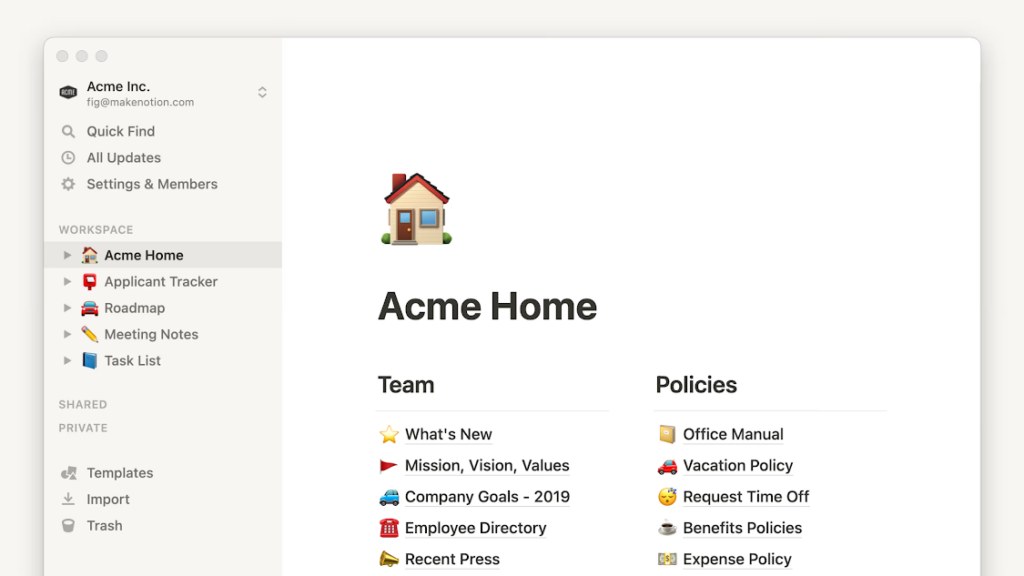
Notion has a clean, minimal interface, but it typically takes time to get comfortable with. New users often spend the first few sessions figuring out how pages, databases, and workspaces relate to each other. The block system is powerful but can feel unfamiliar if you’re coming from a traditional note-taking app. That said, Notion’s template library helps beginners get started without building everything from scratch.
OneNote’s Interface
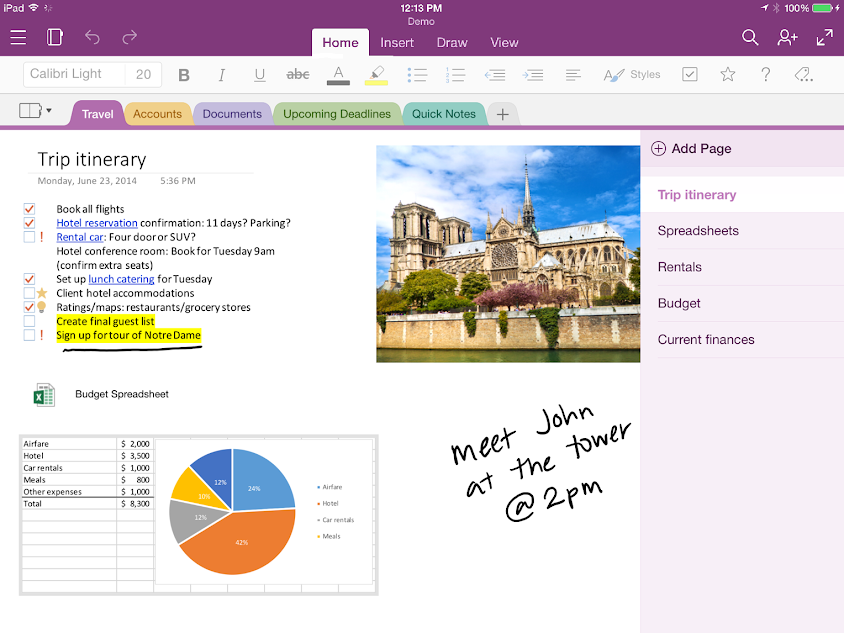
OneNote’s interface is more immediately intuitive, especially for anyone already using Microsoft Office. The notebook, section, and page hierarchy mirrors how most people think about physical organisation. Clicking anywhere on a page and starting to type or draw feels natural from day one. For users who don’t need complex databases or project management features, this simplicity is a significant advantage.
In the Notion vs OneNote interface comparison, OneNote generally wins on initial ease of use, while Notion offers more power once you invest the time to learn it.
Notion vs OneNote: Note-Taking Features
A closer look at Notion and Microsoft OneNote shows how their note-taking tools cater to different types of users and workflows
Text and Formatting
Both tools handle basic text formatting well, including headers, bold, italics, bullet points, and numbered lists. Notion adds support for inline databases, linked mentions, code blocks with syntax highlighting, and callout boxes. OneNote supports rich text formatting too, along with the ability to type anywhere on a freeform canvas, which Notion does not offer.
Handwriting and Drawing
OneNote has a clear advantage here. It supports handwriting input on touch devices, stylus drawing, and even handwriting-to-text conversion. This makes it a strong choice for tablet users, students who like to annotate PDFs by hand, or anyone who prefers a pen-and-paper feel. Notion currently has minimal drawing or handwriting support, making it less suitable for this use case.
Templates
Notion’s template library is extensive, covering everything from personal habit trackers to full company wikis. Many templates are community-built and freely available. OneNote also offers templates, primarily for meeting notes, planners, and class notebooks, but the selection is narrower and less customizable.
Tables and Databases
This is one of the most significant differences in the Notion vs OneNote comparison. Notion’s database system allows users to create tables, boards, calendars, galleries, and timelines, all linked to the same underlying data. You can filter, sort, and relate databases to each other in ways that go well beyond simple note-taking. OneNote tables are functional for basic use, but they don’t support relational data, filtering, or multiple views.
Notion vs OneNote: Organization and Structure
OneNote organizes content into notebooks, sections, and pages, which is a straightforward hierarchy most users grasp quickly. You can also create section groups for deeper nesting. Searching within OneNote is generally reliable and fast.
Notion uses a nested page system where pages can contain other pages, databases, and content blocks. It’s more flexible than OneNote’s structure, but it can also become disorganized if not managed intentionally. Notion added a sidebar improvement and a home dashboard in recent updates that help with navigation.
For users who want a simple, familiar structure, OneNote’s notebook hierarchy is typically more approachable. For users who want full control over how their information is organized and linked, Notion offers more options.
Notion vs OneNote: Collaboration Features
Notion was built with collaboration in mind. Multiple users can edit pages simultaneously, leave comments, mention teammates, and assign tasks within a shared workspace. Notion’s permission system allows for fine-grained access control at the page and database level, which makes it well-suited for teams managing projects or shared knowledge bases.
OneNote also supports real-time collaboration and is particularly well integrated with Microsoft Teams, making it a natural fit for organizations already in the Microsoft 365 ecosystem. Teams can share notebooks directly, and changes sync across devices. However, OneNote’s collaboration features are generally more suitable for shared note-taking rather than structured project management.
In the Notion vs OneNote collaboration comparison, Notion tends to serve teams with complex workflows better, while OneNote is often the easier choice for Microsoft-first environments.
Notion vs OneNote: AI Features in 2026
AI capabilities in Notion and Microsoft OneNote have evolved significantly, adding smart automation and content assistance to everyday workflows.
Notion AI
Notion AI is an add-on that integrates directly into the workspace. It can summarize pages, draft content, translate text, generate action items from meeting notes, answer questions about content in your workspace, and autofill database properties. As of 2026, Notion AI has become a notable part of the product, though it requires a paid add-on on top of the base subscription.
Microsoft Copilot in OneNote
Microsoft has integrated Copilot into OneNote as part of its broader Microsoft 365 Copilot rollout. Copilot in OneNote can summarize notes, generate to-do lists, rewrite content, and answer questions based on your notebooks. Access to Copilot generally requires a Microsoft 365 Copilot license, which is an additional cost for business users.
Both tools now offer meaningful AI assistance. Notion AI tends to be more tightly integrated with databases and structured content, while Copilot in OneNote benefits from Microsoft’s broader ecosystem, including data from Outlook, Teams, and other Office apps.
Notion vs OneNote: Pricing
| Plan | Notion | OneNote |
| Free | Yes, with limited features | Yes, fully free with a Microsoft account |
| Personal paid plan | Plus at ~$10/month | Not applicable (free) |
| Business plan | Business at ~$15/user/month | Included in Microsoft 365 (~$6-$22/user/month) |
| AI add-on | ~$8/member/month | Microsoft 365 Copilot (~$30/user/month) |
OneNote has a significant pricing advantage for individual users since it is entirely free with a Microsoft account and includes unlimited storage via OneDrive (with standard account limits). Notion’s free plan is functional but restricts features that many users will want, such as unlimited page history and advanced permissions.
For teams already paying for Microsoft 365, OneNote comes at no additional cost, which makes it a financially straightforward choice. Notion’s team plans are competitive but represent an added expense.
Notion vs OneNote: Offline Access and Performance
OneNote generally performs better offline. The desktop app caches notebooks locally, allowing users to read and edit notes without an internet connection, with changes syncing once connectivity is restored. Performance is typically fast and reliable across Windows and Mac.
Notion has historically been criticized for slower load times, particularly with large workspaces. Offline support exists in the desktop and mobile apps, but it has been more limited than OneNote’s. Notion has made performance improvements over time, but users with large, complex workspaces may still notice lag compared to OneNote.
Notion vs OneNote: Platform and App Availability
Both tools are available on Windows, Mac, iOS, and Android, as well as through web browsers. OneNote also has a dedicated Windows 10/11 app and is built into many Microsoft devices by default. Notion’s apps are well-maintained across platforms, though the mobile experience can feel limited compared to the desktop version for complex database work.
Notion vs OneNote: Which One Is Better for Students?
For students, OneNote is often the stronger choice. Its freeform canvas works well for annotating lecture slides, its handwriting support suits tablet users, and the Class Notebook feature in Microsoft 365 Education makes it easy for teachers to distribute and collect assignments. The fact that it’s free is also a significant factor.
Notion can work well for students who want to manage their entire academic life, including assignments, reading lists, and project planning in one place. However, the initial setup time and learning curve may not suit everyone, especially during a busy semester.
Notion vs OneNote: Which One Is Better for Teams and Businesses?
For teams that need a structured knowledge base, project tracking, and collaborative workflows, Notion typically has the edge. Its database features, linked pages, and workspace structure make it closer to ClickUp and other project management tools than a traditional note-taking app, which can be genuinely valuable for growing teams.
For businesses already using Microsoft 365, OneNote is usually the more practical choice. It integrates directly with Outlook for meeting notes, Teams for collaboration, and SharePoint for document management. Adding another paid tool on top of an existing Microsoft subscription may not be justified unless Notion’s specific features offer clear value.
Notion vs OneNote: A Side-by-Side Comparison
| Feature | Notion | OneNote |
| Free plan | Yes (limited) | Yes (fully featured) |
| Databases and views | Yes (strong) | No |
| Handwriting support | Minimal | Strong |
| Freeform canvas | No | Yes |
| AI features | Notion AI (add-on) | Copilot (add-on) |
| Offline access | Limited | Strong |
| Microsoft 365 integration | No | Native |
| Template library | Extensive | Moderate |
| Learning curve | Moderate to high | Low |
| Best for | Teams, power users | Students, Microsoft users |
Final Verdict: Notion vs OneNote in 2026
The Notion vs OneNote decision ultimately comes down to how you work and what you need from a productivity tool.
OneNote is a strong choice if you want a free, reliable, and familiar digital notebook that works seamlessly within the Microsoft ecosystem. It’s particularly well-suited to students, educators, and professionals whose organizations already use Microsoft 365. The handwriting support, freeform canvas, and offline reliability give it real practical advantages that Notion currently doesn’t match in those areas.
Notion is worth considering if you need more than a note-taking app. Its database system, linked pages, and flexible workspace structure make it genuinely useful for teams managing projects, building internal wikis, or tracking information in structured ways. The trade-off is a higher learning curve, additional cost, and somewhat weaker performance on the basics that OneNote handles effortlessly.
For many users, the answer to the Notion vs OneNote question isn’t about which app is objectively better. It’s about which one fits the way you already work. If you’re embedded in Microsoft tools, OneNote is likely the smarter pick. If you need a customizable workspace that grows with your team, Notion is worth the investment.