
Choosing where to store your photos is a decision that tends to stick with you for years. Move your library to the wrong platform, and you could face limitations, unexpected costs, or the frustration of being locked into a walled garden that does not fit your lifestyle. In the debate of Google Photos vs iCloud, these two services are the most popular cloud photo storage options available today, and each takes a noticeably different approach. Google Photos prioritizes smart AI features, cross-platform flexibility, and generous free storage, while iCloud leans into seamless Apple device integration, strong privacy defaults, and original-quality backup.
This guide breaks down every meaningful difference between the two so you can make a well-informed choice, whether you are a casual iPhone user, a multi-device household, or someone who cares deeply about where your data goes.
What Are Google Photos and iCloud Photos?
When comparing Google Photos vs iCloud, two of the most popular cloud storage solutions are Google Photos and iCloud Photos. Both help you store, organize, and access your photos seamlessly, but they differ significantly in features, ecosystem integration, and overall user experience.
Google Photos
Launched by Google in 2015, Google Photos is a cloud-based photo and video storage service available on Android, iOS, Mac, Windows, and through any web browser. It is powered by Google’s machine learning capabilities, enabling features such as face recognition, semantic image search, and automatic creation of collages, animations, and highlight reels. Storage counts against the overall Google account quota shared with Gmail and Google Drive.
iCloud Photos
iCloud Photos is Apple’s built-in cloud photo service, deeply integrated into every iPhone, iPad, and Mac. When enabled, it automatically uploads and syncs every photo and video you capture across your Apple devices, helping manage storage on iPhone more efficiently by offloading full-resolution files to iCloud. iCloud storage is shared across all Apple services, including device backups, files, and notes. While iCloud can be accessed through a limited web interface, its full feature set is generally available only on Apple hardware.
Storage Plans and Pricing
Storage is often the first factor people
consider, and this is where the two services differ most noticeably from the
start.
|
Plan |
Google Photos / Google One |
iCloud+ |
|
Free Storage |
15 GB (shared w/ Gmail |
5 GB (shared w/ all iCloud |
|
Entry Paid |
100 GB – $1.99/month |
50 GB — $0.99/month |
|
Mid Tier |
200 GB – $2.99/month |
200 GB — $2.99/month |
|
Large Tier |
2 TB – $9.99/month |
2 TB — $9.99/month |
|
Family Sharing |
Up to 5 members (Google |
Up to 5 members (Family |
|
Storage Type |
Photos & videos only |
Photos, videos, files, |
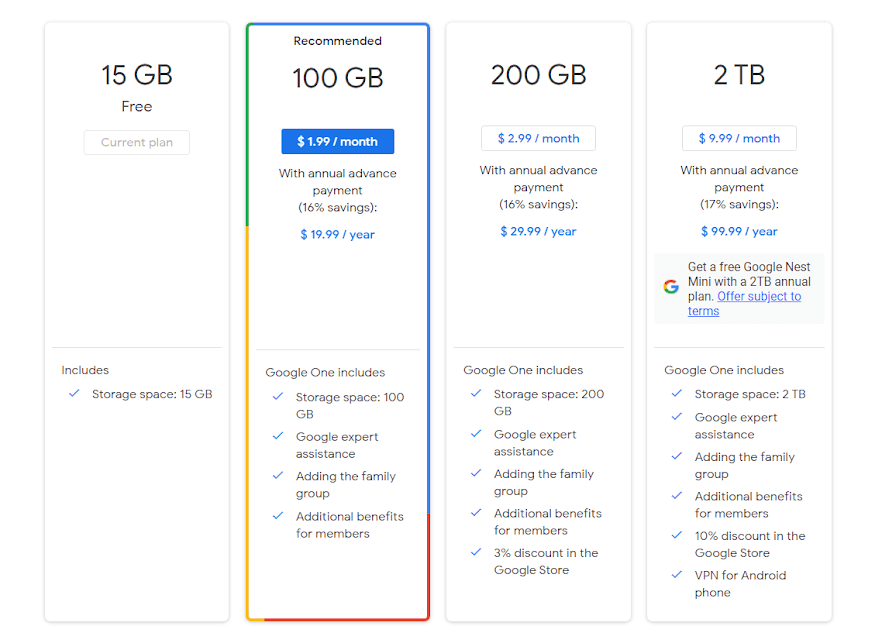
Google Photos provides 15 GB of free
storage, which is three times what iCloud offers at no cost. However, Google’s
free storage is shared across Gmail, Google Drive, and Google Photos, so a busy
inbox can consume a significant portion of that quota faster than expected.
iCloud’s 5 GB free tier fills up quickly,
particularly because it covers not just photos but also device backups, app
data, notes, and messages. Most iPhone users will likely need to upgrade to a
paid iCloud+ plan relatively soon after enabling iCloud Photos.
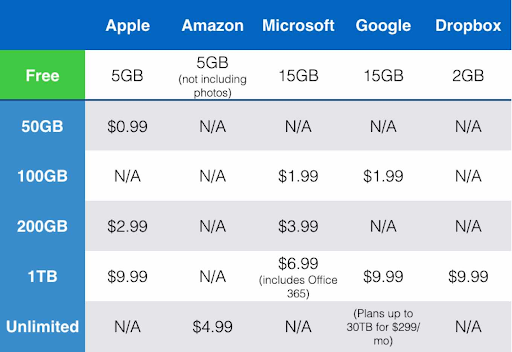
On the paid side, iCloud has a slight edge
at the entry level: $0.99 per month for 50 GB versus Google’s $1.99 per month
for 100 GB. At higher tiers, both services converge to similar pricing.
|
Note iCloud does not offer a plan between 5 GB (free) and |
Platform and Device Compatibility
This is arguably the most important
practical distinction between the two services.
Google Photos is available as a native app
on iOS, Android, Mac, and Windows, and its web interface at photos.google.com
offers a nearly identical experience to the app. Users can upload photos from
any device, search their full library, and access editing tools entirely
through the browser.
iCloud Photos is primarily designed for
Apple devices. There is no iCloud app for Android, and the Windows app
(available through the Microsoft Store) offers limited functionality compared
to the native Mac experience. The iCloud web interface at icloud.com provides
basic browsing and download capability, but features such as photo search,
editing, and album suggestions are not available there.
|
Key Takeaway If you share photos with people who use Android or |
Photo Quality and Backup Behavior
Photo quality and backup behavior differ significantly between cloud services, making your choice between Google Photos vs iCloud important. While iCloud Photos preserves full-resolution images and Apple-specific formats, Google Photos offers flexible options that balance image quality with storage savings.
iCloud Photos
iCloud Photos uploads your photos and
videos at their original, full resolution by default. When your device storage
is limited, iCloud can replace full-resolution images on your device with
smaller, optimized versions while keeping the originals in the cloud. This is
especially beneficial for iPhone users who shoot in ProRAW or ProRes, as iCloud
handles these formats natively without conversion.
Live Photos are also preserved completely,
retaining their motion and sound when synced across Apple devices.
Google Photos
Google Photos offers two upload quality
options. ‘Original Quality’ stores photos at their full resolution, counting
against your storage quota. ‘Storage Saver’ (formerly called High Quality)
compresses images, which works well for most casual photography but may result
in minor quality differences on very large prints or professional work.
It is worth noting that Google Photos may
not fully preserve Apple-specific formats such as Live Photos and ProRAW files
in the same way iCloud does. Live Photos may be converted to still images or
short video clips depending on the device and app version being used.
Features and Organization Tools
|
Feature |
Google Photos |
iCloud Photos |
|
Platform Support |
iOS, Android, Windows, Mac, |
iPhone, iPad, Mac, limited |
|
AI Search |
Excellent – people, |
Good – people & scenes, |
|
Photo Quality Upload |
Original or Storage Saver |
Original quality by default |
|
Editing Tools |
Advanced AI filters, Magic |
Strong native editing via |
|
Shared Albums |
Link-based, cross-platform |
Apple-to-Apple best; link |
|
Auto Memories |
Yes – collages, animations, |
Yes – Memories, Highlights, |
|
Privacy Approach |
Server-side AI processing |
On-device ML, end-to-end |
|
Offline Access |
Yes (downloaded photos) |
Yes (Optimize/Keep |
|
Web Interface |
Full-featured — edit, |
Basic — no search or |
|
Live Photo Support |
Partial — plays but may |
Full native support |
|
ProRAW / ProRes |
Limited support |
Full native support |
AI and Search
Google Photos has a strong advantage in
AI-powered search. Users can search by object, location, person, text in
images, type of activity, and more. The results are typically accurate and
fast. Google’s machine learning also automatically groups photos by face, even
without manual tagging.
iCloud Photos uses Apple’s on-device
machine learning for facial recognition and scene detection. The search
functionality is capable and improving, but generally less comprehensive than
Google’s. Importantly, Apple’s approach keeps processing on the device rather
than sending data to external servers, which has privacy advantages.
Editing Tools
Google Photos includes a range of
AI-assisted editing tools, such as Magic Eraser (which can remove unwanted
objects from photos), HDR adjustments, and stylized filters. These are
available directly in the app and through the web browser.
iCloud Photos works in conjunction with
Apple’s native Photos app, which offers non-destructive editing with controls
for exposure, color, sharpness, and more. The editing tools in Apple’s Photos
app are generally considered strong, and all edits sync across Apple devices.
Some advanced editing features in Apple Photos, such as Portrait adjustments
and selective color tools, are specific to Apple hardware and may not be
available on other platforms.
Memories and Auto-Creations
Both services automatically surface
memories and curated photo collections. Google Photos creates Memories,
highlight videos, collages, and animated GIFs from your library. iCloud
generates Memories albums and Memories slideshows with music, accessible in the
Apple Photos app. The two approaches are comparable in quality, though Google’s
Memories tend to update more frequently and offer more creative formats.
Sharing
Google Photos makes it easy to create
shared albums and send links that anyone can view or contribute to, regardless
of whether they use Google Photos. This makes it practical for sharing with
mixed-device groups.
iCloud offers Shared Albums and, more
recently, the Shared Photo Library feature (available in iOS 16 and later),
which lets up to five people collaborate in a single shared library. However,
sharing with non-Apple users typically involves generating an iCloud.com link,
which provides limited functionality compared to the native experience.
Privacy and Data Security: Google Photos vs iCloud
Privacy is a meaningful differentiator
between the two platforms.
iCloud Photos and Privacy
Apple has publicly positioned privacy as a
core product value. iCloud Photos uses end-to-end encryption when the Advanced
Data Protection feature is enabled (available in iOS 16.2 and later). With this
setting turned on, even Apple cannot access your photos. The Photos app also
performs facial recognition on-device rather than sending data to Apple’s
servers, which reduces the amount of personal information transmitted
externally.
Google Photos and Privacy
Google processes photos on its servers to
power features such as AI search, face grouping, and automatic creations.
Photos are encrypted in transit and at rest, but because server-side processing
occurs, the data passes through Google’s infrastructure. Google’s broader
business model is advertising-driven, and while Google states it does not use
Google Photos content to target ads, users who prioritize data minimization may
find iCloud’s approach more appealing.
|
Privacy Note Users who want maximum privacy should enable Advanced |
Ease of Use and Daily Experience
In day-to-day use, both services largely
run in the background without requiring much attention. However, the experience
differs depending on which devices you use.
For iPhone users, iCloud Photos feels
almost invisible. Photos sync automatically without opening a separate app,
edits appear across all Apple devices instantly, and the experience within the
Photos app is polished and consistent. There is no additional app to manage.
Google Photos requires the app to be installed
and running for backup to occur on iPhone. The interface is well-designed,
intuitive, and offers a clean timeline view. Its search bar is arguably more
useful than iCloud’s search in day-to-day use, particularly for locating
specific photos quickly.
For Android users, there is no meaningful
comparison: iCloud does not offer an Android app, making Google Photos the only
full-featured cloud photo solution from these two options on that platform.
Which Should You Choose: Google Photos vs iCloud?
The right choice depends on your devices,
sharing habits, and priorities. Here is a practical breakdown.
|
Your Situation |
Best Choice |
|
Only use iPhone/iPad/Mac |
iCloud Photos |
|
Mix of Android, Windows, |
Google Photos |
|
Need maximum free storage |
Google Photos (15 GB vs 5 |
|
Privacy is top priority |
iCloud Photos |
|
Want the best AI-powered |
Google Photos |
|
Shoot ProRAW or Live Photos |
iCloud Photos |
|
Share photos with Android |
Google Photos |
|
Want cheapest entry-level |
iCloud+ ($0.99/month for 50 |
|
Want largest free-tier |
Google Photos (15 GB free) |
Consider Using Both
It is also worth knowing that the two
services are not mutually exclusive. Some users keep iCloud Photos as their
primary backup for full-resolution originals while using Google Photos as a
secondary backup or for cross-platform sharing. If you go this route, be
mindful of storage quotas on both platforms.
Frequently Asked Questions
1. Does Google Photos reduce photo quality?
Ans. Only if you select the ‘Storage Saver’
option, which compresses photos. If you choose ‘Original Quality,’ photos are
stored at their full resolution, though they count against your Google storage
quota.
2. Is iCloud safer than Google Photos?
Ans. Both platforms use encryption. iCloud
offers end-to-end encryption when Advanced Data Protection is enabled, meaning
Apple cannot access your photos. Google Photos encrypts data in transit and at
rest, but server-side processing for AI features means Google’s systems do
interact with your images. For maximum privacy, iCloud with Advanced Data
Protection is generally considered stronger.
3. What happens to my photos if I cancel my paid plan?
Ans. With Google Photos, if you exceed the free
15 GB limit after downgrading, you can still view and download your photos, but
uploading new ones will be paused until you free up space or upgrade again.
With iCloud, photos remain accessible for a period, but if you downsize below
your usage, syncing will stop and data may be removed after 30 days if not
addressed.
4. Does iCloud work on Android?
Ans. Not as a dedicated app. Android users can
access iCloud through a web browser at icloud.com, but the experience is limited.
There is no native Android iCloud app available.
5. Which is cheaper for large photo libraries?
Ans. At the 2 TB tier, both services cost $9.99
per month. For smaller libraries, iCloud offers a 50 GB plan at $0.99 per
month, which Google does not match directly. For very large libraries beyond 2
TB, iCloud now offers 6 TB and 12 TB plans, which Google does not currently
provide through standard Google One tiers.
Conclusion
Neither Google Photos nor iCloud is
universally better. They are optimized for different types of users and
different priorities.
iCloud Photos works best when you are fully
committed to Apple hardware, value seamless integration, and want strong
privacy defaults. It handles Apple-specific formats beautifully, requires no
extra setup, and, with Advanced Data Protection enabled, provides one of the
more private photo storage options available.
Google Photos is generally the stronger
option if you use multiple device types, want the most powerful AI-based photo
search, need to share with people who do not use Apple products, or simply want
more free storage before reaching for your wallet.
If you are still unsure, try both for a few
weeks. Both services offer free tiers, and seeing how each fits into your daily
routine is often the clearest way to make the right call.